Business
Software, sites and marketing for real businesses: a small remodeling company run with AI, a real-estate brokerage, a data-licensing deal engine and a consumer app.
A small business, run with AI
A small design-build remodeling business. AI runs the paperwork and the marketing: the office app, the public website, the ads and the posting schedule.
Case study 02 · Office app
RSC Tool
Two tools for a small remodeling business: an operations app that runs entirely on one Mac, reads the business inbox with a local AI model and never touches the books without the owner's approval, and a phone-first job tracker that shows what each job really earns once crew hours are counted.
RSC Tool
Two tools for a small remodeling business: an operations app that runs entirely on one Mac, reads the business inbox with a local AI model and never touches the books without the owner's approval, and a phone-first job tracker that shows what each job really earns once crew hours are counted.
Click through the demoThe demo is the real app's pages filled with made-up jobs; saving and AI are switched off.
The problem
Jobs, phased payments and expenses lived in a spreadsheet. Receipts, client payments and new leads arrived by email. Estimates, contracts and change orders were written by hand, and nobody could say what a job had cost in labor until it was over.
The constraints shaped everything. The owner is not a programmer, client data had to stay on his computer, and nothing could reach the books or a client without his say.
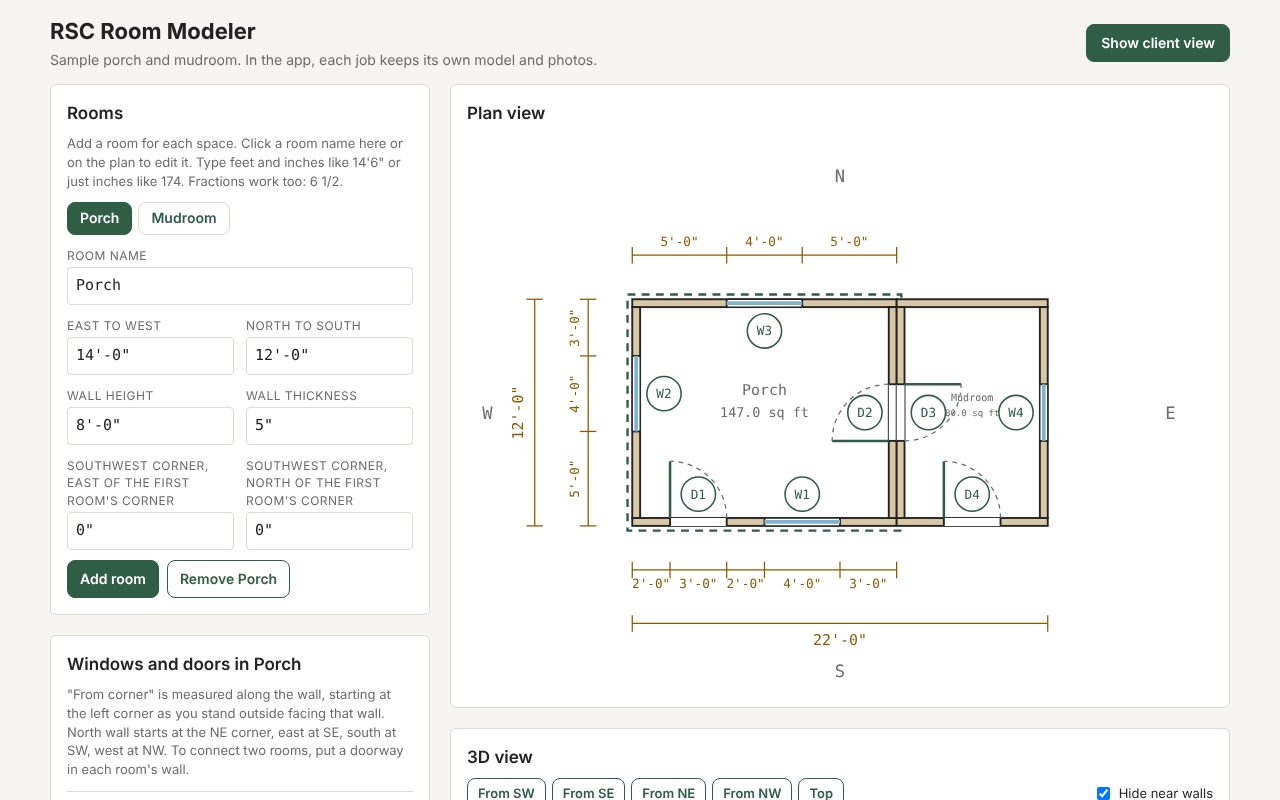
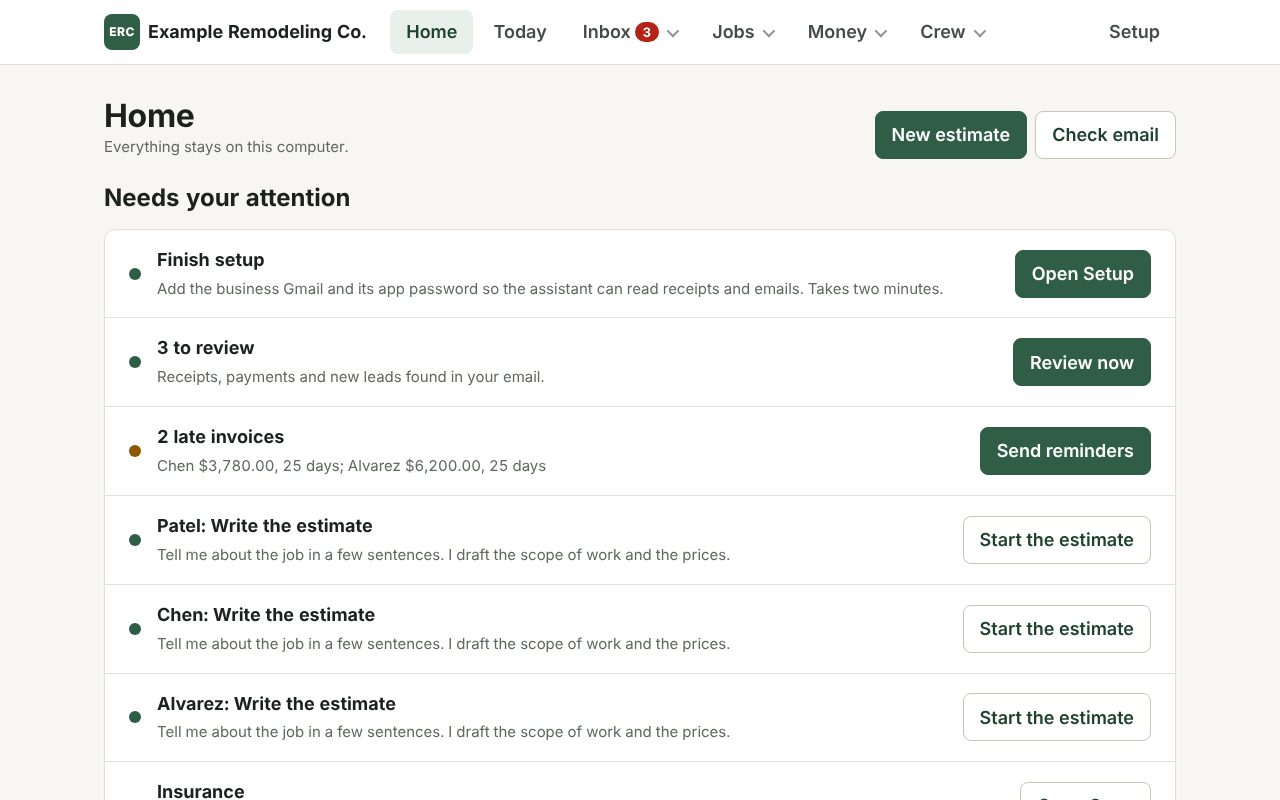
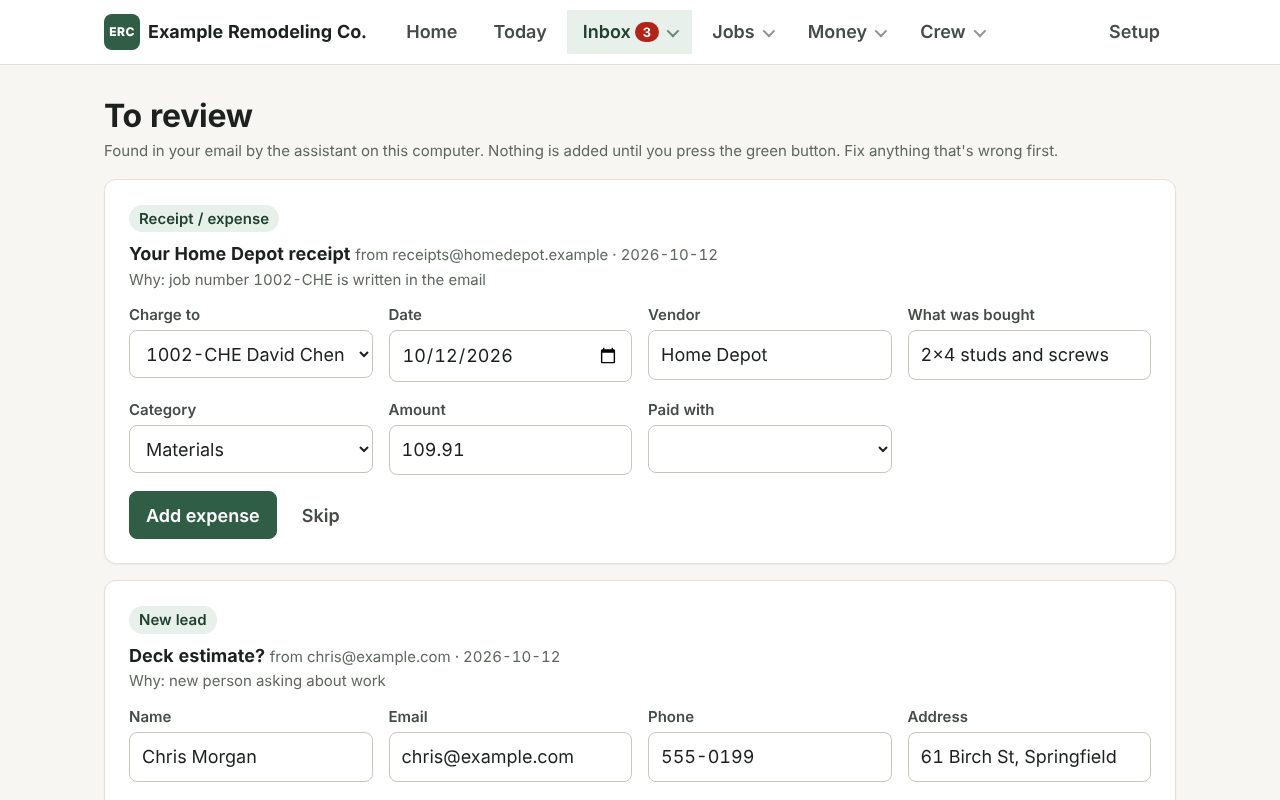
What it does
Inbox to books
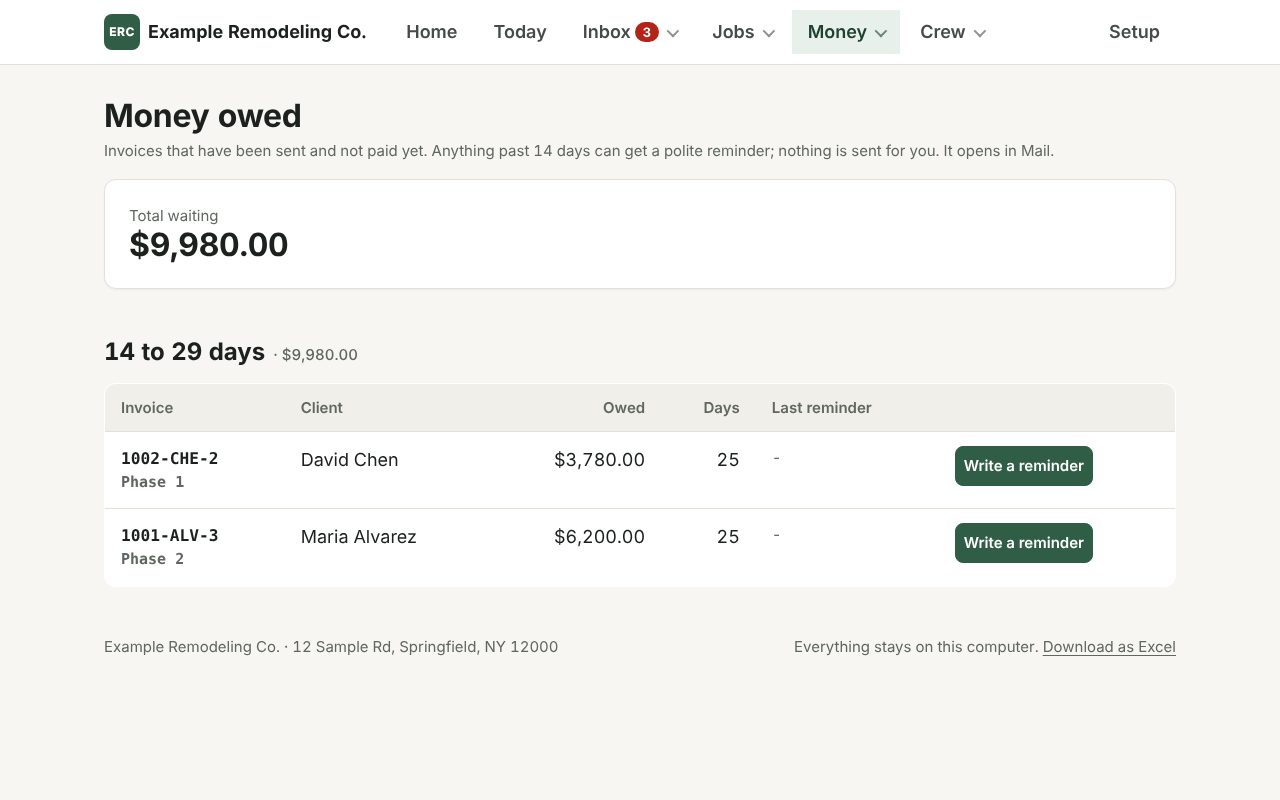
Every 30 minutes a local model reads the inbox read-only and returns a fixed JSON shape at temperature 0. Plain code then matches each receipt, payment or lead to a job: a job ID in the email first, then a unique street address, then a unique client surname. If two jobs fit, it asks.
Labor cost per job
Labor per crew-hour is computed from the estimate's own crew and duration lines, with part-timers counted as half. It warns below the floor rate, compares spend with the estimate's budget, and switches to logged hours once they pass the guess.
Money that adds up
Job IDs, payment IDs and change-order IDs follow one scheme and double as invoice numbers. Payment schedules are generated by rule and tested to the cent. A change order signed with a finger on a phone updates the contract and schedule together.
Hands-free input
Any big text box takes speech through a local Whisper model of about 150 MB. Receipt photos and insurance certificates are read by a local vision model, with the job picked by the same rules as email.
Runs itself
A double-click installer needs no admin password, sizes the models to the Mac's memory, and sets up five background jobs: the app, the mail check, a Monday report, a 6 AM crew sheet and the model server. Daily backups keep 30 copies, and a doctor command checks everything.
Built from research
A market study of the local remodeling trade set the pricing checks: industry margins imply a 43% materials markup rather than 20%, and the crew-hour floor comes from local wage and billing data.
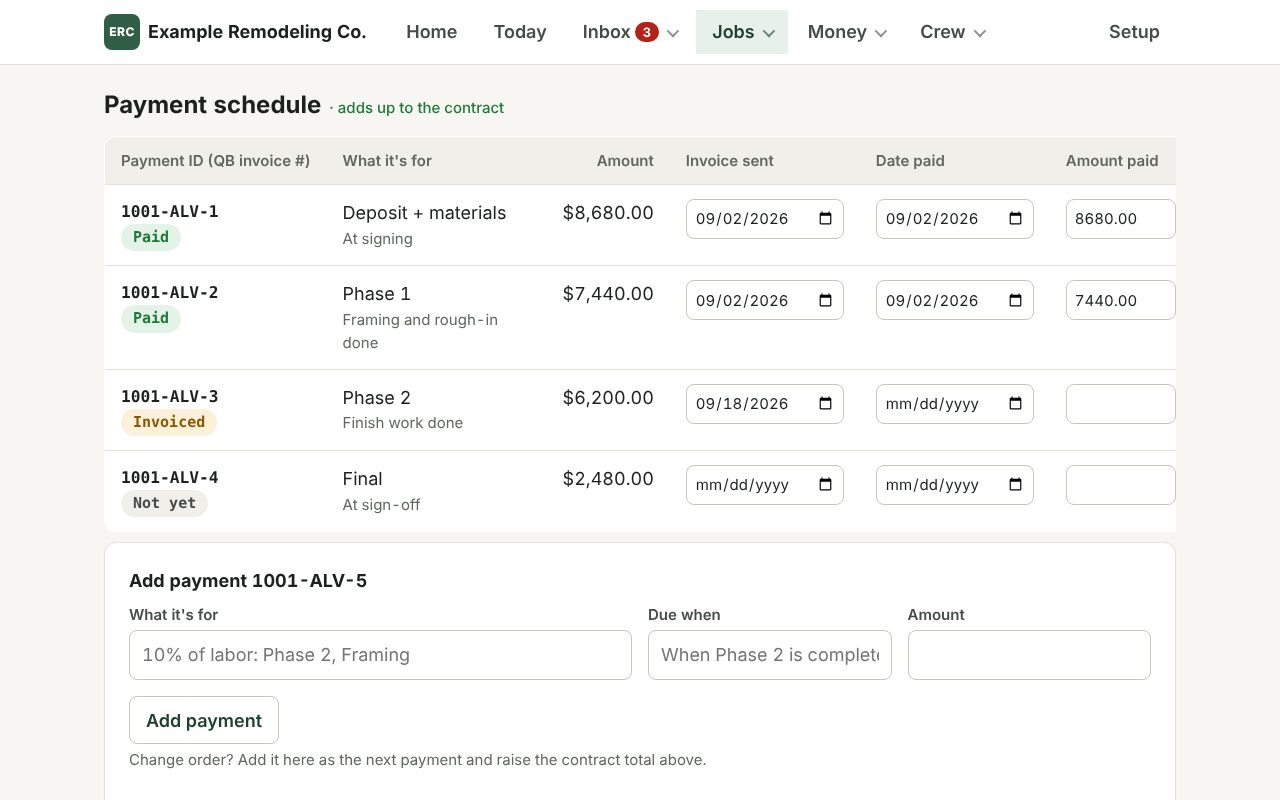
Since the first version
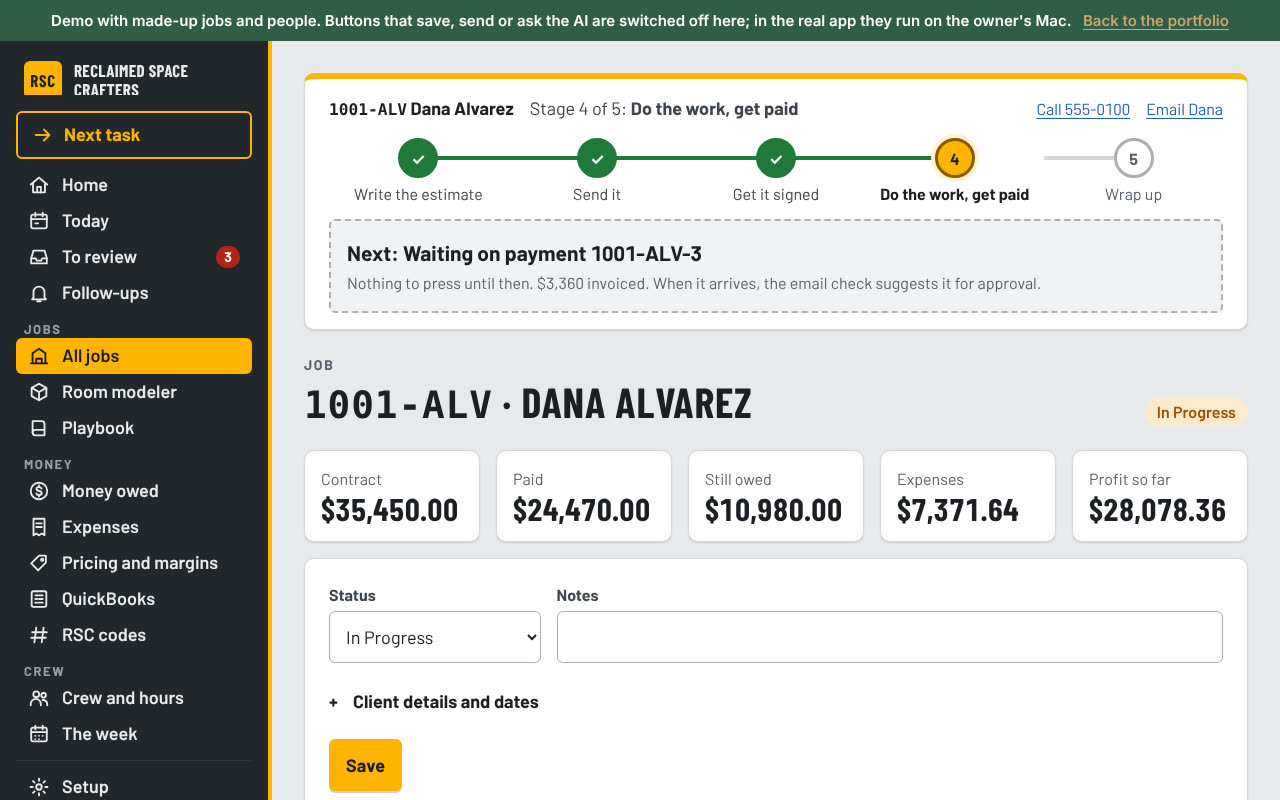
- Never lost. A five-stage tracker on every job, a glowing next step, and a Next task button.
- One-click Send. The estimate goes to the client as a PDF from the owner's own Gmail, only when he presses Send.
- Every attachment read. Each PDF or photo in an email becomes its own item to review.
- A downloadable Mac app, built and released automatically when the version changes.
In review now: a pricing check before an estimate goes out, a rough range and site-visit questions from a lead's photos, Google review requests, a weekly scorecard of leads and wins, and instant follow-up for website leads.
Decisions behind it
- The model drafts, code decides. Prices, totals, dates, IDs and job matching are computed in code. If a model's draft drops a required fact, the app falls back to a plain template.
- Fewer fields. A sentence like "Home Depot 109.91 studs for Smith" fills in an expense. Every page keeps a by-hand form for when the model is off.
- Nothing sent for him. Emails open in his mail app to read and send. Reminders never mention fees or lawyers.
- Readable by design. The redesign cut 14 tabs to 5 groups, set text at 18px with nothing under 15px, and made every control at least 48px tall.
Where it goes next
A productizing plan finds about 70% of the app is generic, with the owner-specific parts being configuration rather than architecture. The plan is to treat this business as customer number one, then offer done-for-you setups to three to five local remodelers, with a pilot kit and sales sheet ready.
Part two: the crew job tracker
The second tool answers one question the owner's spreadsheet could not: after materials, subcontractors and crew time, how much does a job actually leave? Hours were invisible, so every job looked more profitable than it was. The tracker puts crew time on the books as money.
Two buttons, every day
Today opens with Log hours and Log a cost, because that two-minute habit is what the whole system depends on. Everything else sits below it: what needs a decision, the week's schedule and the job board.
Money left, live
Set the crew's cost per hour once, and every job shows contract minus materials and subcontractors minus labor. Setup leads with the pricing floor: overhead per hour, break-even and the minimum billable rate.
Six screens, built for a phone
Today, Jobs, a job (work, money and history tabs), Money across all jobs, Archive and Setup, with a bottom tab bar on phones. The first version had no navigation at all below 680px, so a crew member on a phone could not get around.
Change orders and invoices
A change order does not move the contract until the customer approves it, and an approved one can be voided, which reverses it out of the total. Invoices flag when they are past due, and a queue lists costs with no receipt.
Nothing is ever lost
Every removal is reversible and goes to an archive that shows who removed it and why. Deleting a job hides it as a unit and restoring brings back everything attached. Settled records, such as a paid invoice, refuse to delete without an explicit acknowledgement.
Built for four people
The owner plus up to four crew. The first version had six roles with server-side rules, which was too much for a team that size, so the lightweight version trims permissions to roughly viewer, editor and owner.
Two versions, on purpose
- A full web app. About 6,300 lines across 24 files, with a database, six roles and backups with checksums. Roughly half was inherited from the ChatGPT and Codex first draft; the lifecycle system, query layer, all six screens and the design system are the Claude Code rewrite. It runs on the owner's computer.
- A shareable version on Claude's artifact pages. Built to be shared with a link. It stores data in the page's shared store and falls back to the phone's own storage if sharing is not available.
What testing caught
- A migration that would have hidden every job. The generated database migration filled a status column with the literal text of its own name, so no job matched "active" and all of them vanished from every screen. It was reproduced against a rebuilt copy of the live database and patched by hand.
- No mobile viewport tag. The artifact laid out at desktop width and shrank to unreadable on a real phone. It looked fine on a laptop.
- Two people logging at once. Each person writes only their own document per job, so two crew members cannot overwrite each other. A second phone's entry updated the first live in testing.
Both tools were built with AI. The Mac operations app was built in Claude Code from the owner's real estimates, contract terms and tracker. Claude wrote the code and tests within rules I set. The repo also carries a guide written for the next Claude session on the owner's Mac. It sets out how to explain changes in plain words, back up before any change, keep database migrations additive, test on a copy, and never edit contract text without review.
Case study 27 · Website
rscrafters.com
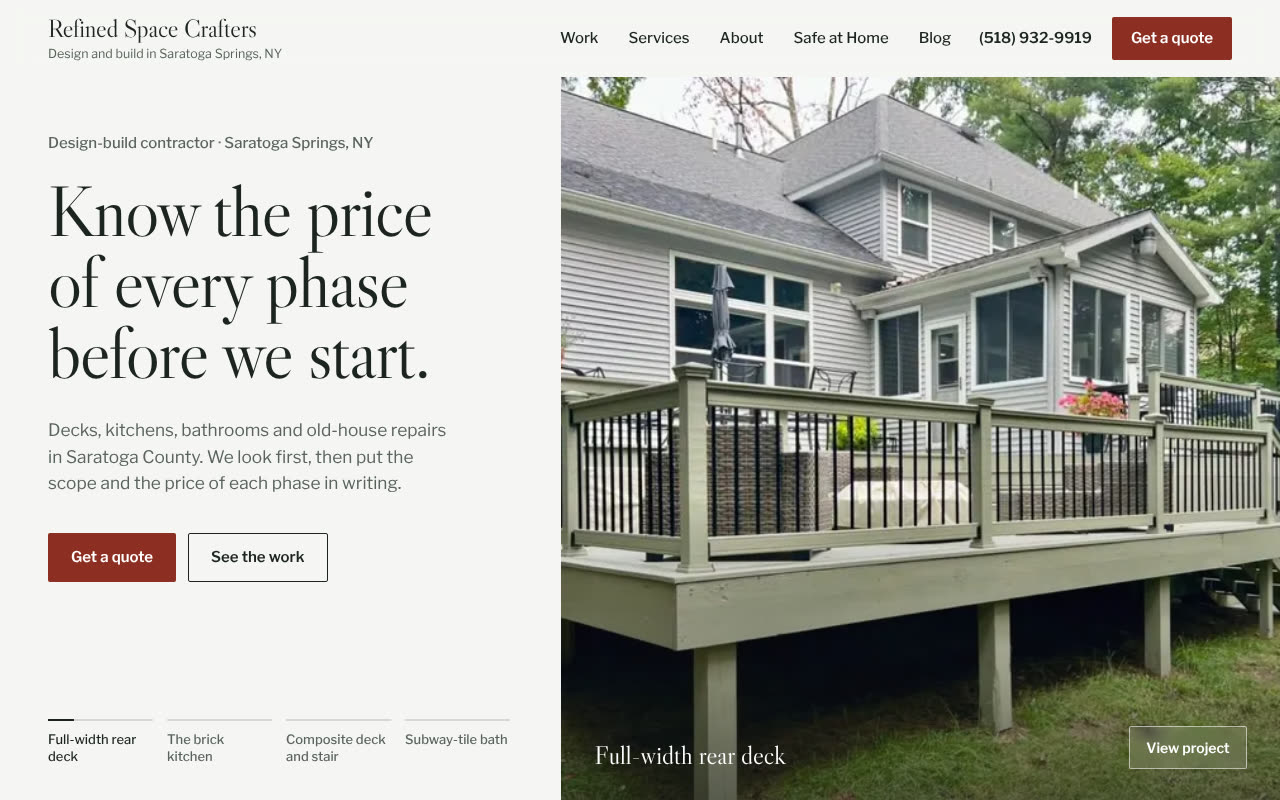
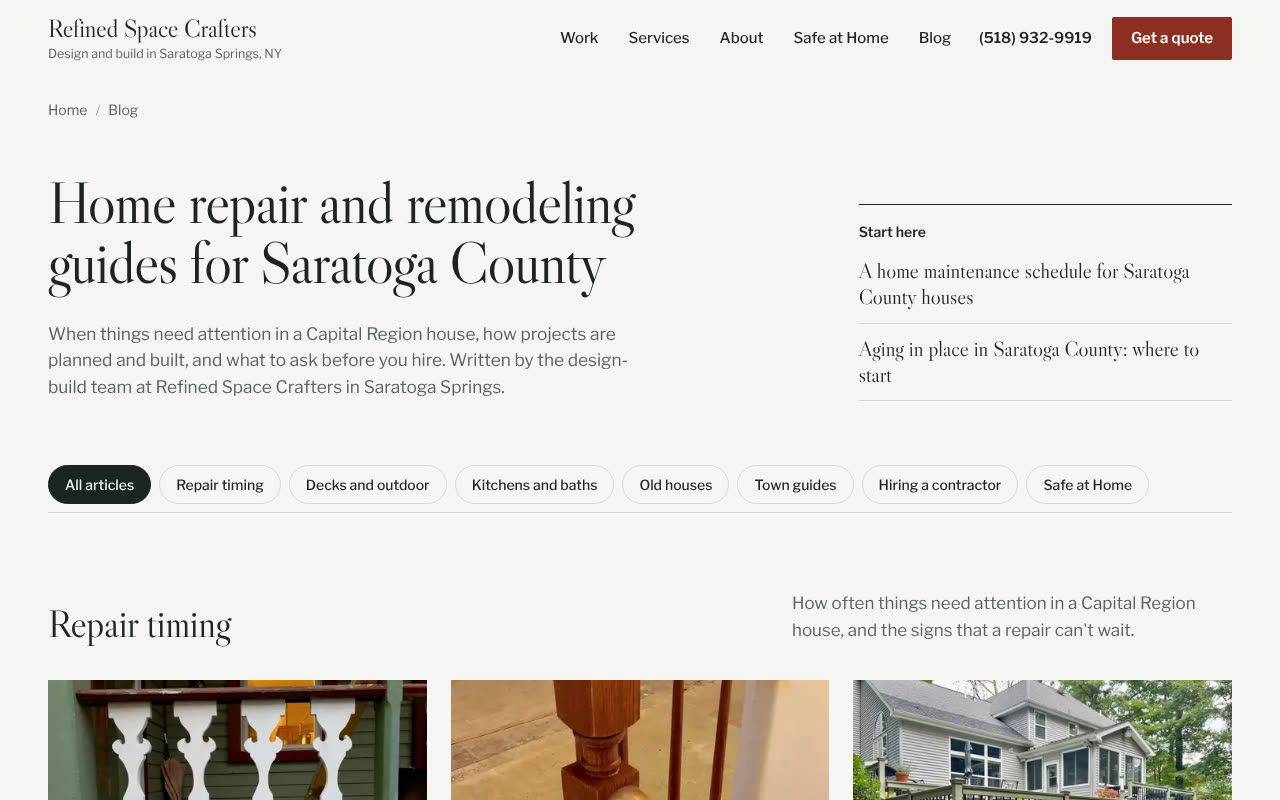
The business's public website, with a blog of plain-spoken repair and remodeling guides for local homeowners. It lives in the same repo as the app, and every change goes through a pull request with its own preview link. Merging is what makes it live.
rscrafters.com
The business's public website, with a blog of plain-spoken repair and remodeling guides for local homeowners. It lives in the same repo as the app, and every change goes through a pull request with its own preview link. Merging is what makes it live.
Visit rscrafters.comRead the blog
What's on it
Pages for the work that pays
Service pages for kitchens, bathrooms, decks and stairs, restoration and built-ins, and outdoor work, ordered by the jobs the business most wants. Town pages for the surrounding area help it show up in local search.
A blog written to a brief
Each post comes from a keyword plan and a writing brief: plain words, the builder's voice, local detail. The brief bans prices, license and insurance claims, invented testimonials and any claim of past work the business hasn't done.
Safe at Home
A page for aging-in-place work, built from research into local demand and funding programs. It invites a home safety visit and is careful not to claim experience the business doesn't have yet.
A quote form that feeds the app
The quote form asks for as little as possible. I'm wiring it into the office app, where each request becomes a new lead card waiting for the owner's OK.
Checks that block bad pages
The build fails on broken links and on banned wording, so a post that slips in a price or an unconfirmed claim can't go live.
Found by search engines
A sitemap and robots file are built with every page, and the site is verified in Google Search Console and Bing Webmaster Tools.
How it goes live
- One source. The site's only source is a folder in the app's repo. Nothing gets dragged, dropped or uploaded by hand.
- Previews on every change. A GitHub Action builds and checks each pull request and posts a preview link, so the owner can see a change before it's live.
- Merge to publish. On merge, the Action uploads the build to Cloudflare Pages and then checks that the live domain is serving it.
- Public means public. Draft notes and placeholders stay out of the live pages. Open questions are kept in the project's notes instead.
Built for the owner to change
The site folder has its own guide for the next AI session on the owner's computer: explain changes in plain words, edit on a branch, run the build, share the preview, and never publish any other way. That lets the owner ask for a change in a sentence without learning Git.
Built with Claude, first as a draft site I could share and review, then moved into the repo with Claude Code once the domain was live. Claude wrote the pages, the posts (from my brief and the business's real projects), the build and check scripts, and the deploy Action.
Case study 28 · Animation
Ad studio
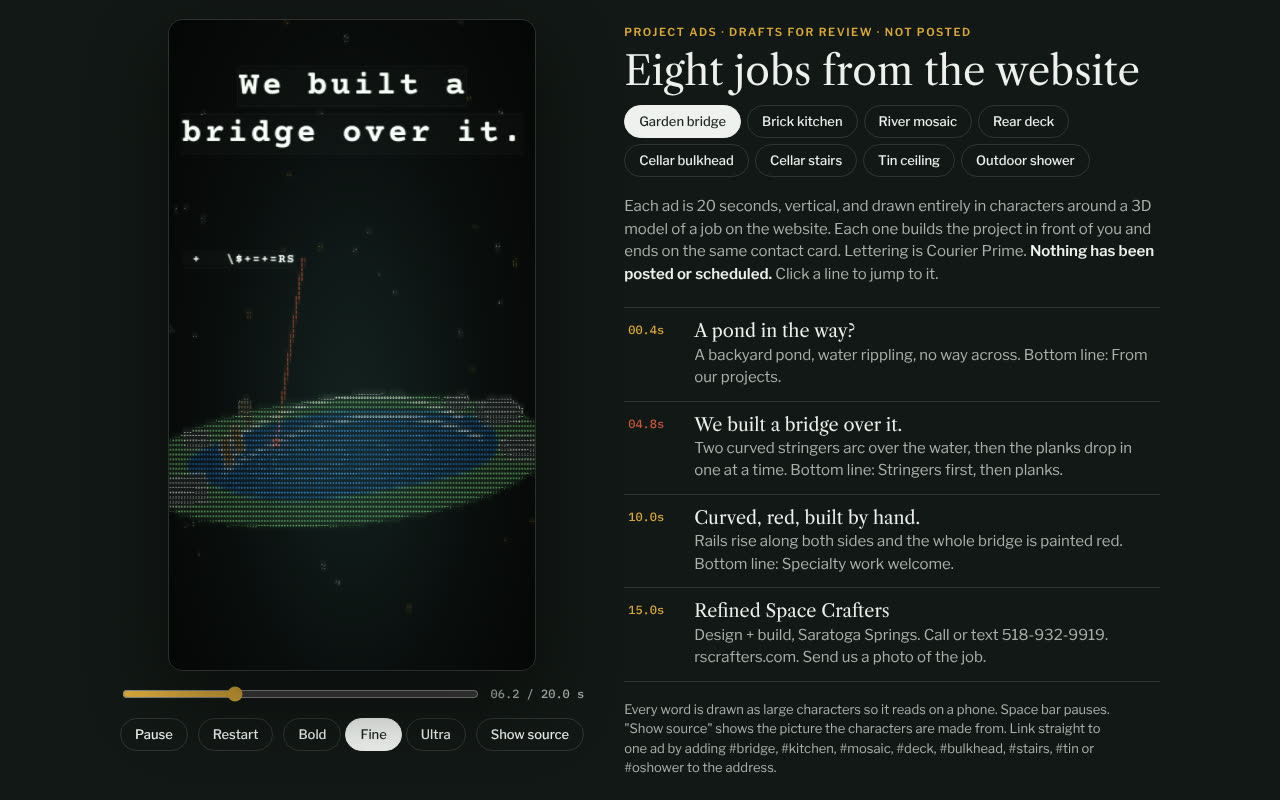
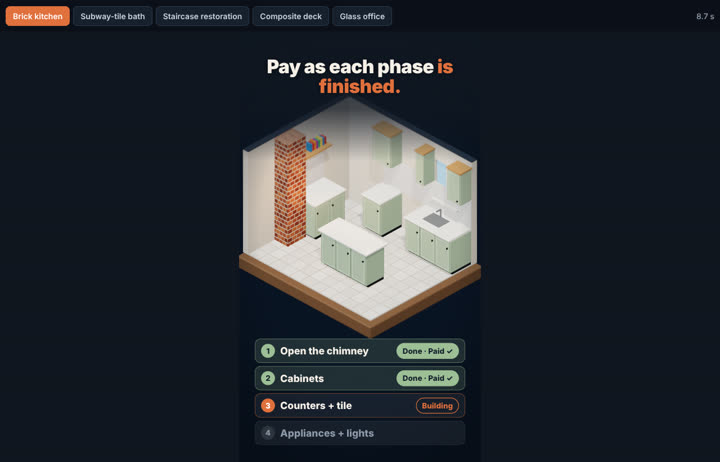
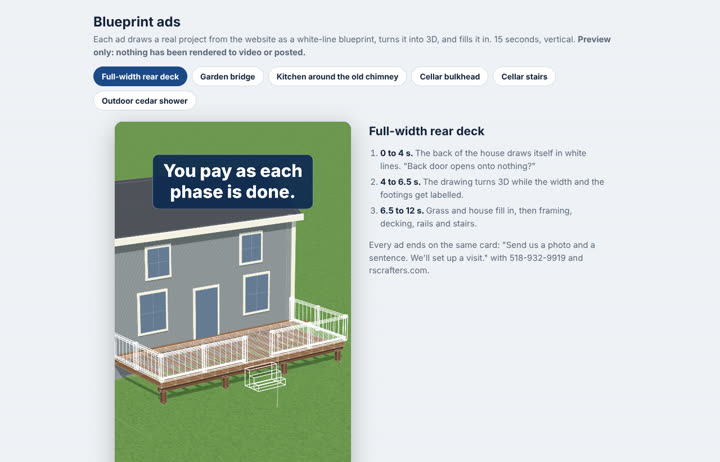
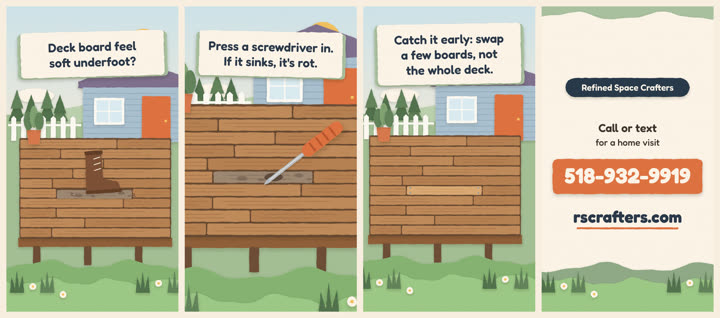
Short vertical video ads for the business in six animation styles, from real Blender claymation to ads drawn entirely in text characters. One brand file drives every end card, so a new phone number means re-rendering only the end card, not every video.
Ad studio
Short vertical video ads for the business in six animation styles, from real Blender claymation to ads drawn entirely in text characters. One brand file drives every end card, so a new phone number means re-rendering only the end card, not every video.
Watch the clay adsASCII demoDollhouse demoBlueprint demoPaper-cut demo
The claymation ads
Each one has a different animal homeowner and the same beaver builder. They're the business's main TikTok style.
Six styles
Claymation
Real 3D clay in Blender, rendered on cloud CPUs. Plasticine materials carry fingerprint and smudge texture and a slight frame-to-frame "boil", and the animation runs on twos like stop motion. Long renders are split by frame range across several AI sessions working in parallel, then joined.
ASCII
Every frame is drawn live in the browser from text characters wrapped around a 3D model of a real job from the website. Words are set as large characters so they read on a phone.
Dollhouse
A tilt-shift, cut-away room in three.js that builds itself phase by phase, with each phase ticking over to "Done · Paid". It sells the business's pay-as-each-phase-is-done terms without saying a price.
Blueprint
A floor plan draws itself on blueprint paper, then rises into a 3D model with real dimensions.
Paper-cut
Layered paper shapes with hand-cut edges, soft shadows and parallax, built in Remotion.
Animal explainers
Quick repair tips with a grandma rabbit and a beaver builder in Remotion. The characters share one skeleton rig with swappable skins, and a new video is a short JSON spec: the engine adds the timing, sound cues and checks for things like headlines that leave the screen too fast.
Rules that keep it cheap and safe
- Preview before render. Every new ad starts as an HTML preview or storyboard. Nothing is rendered until it is approved, which saves hours of wasted renders.
- Modular end cards. Business name, phone, web address and tagline live in one brand file. The end card is its own segment, rendered separately and joined to the body, so a contact change re-renders only the card.
- Real sound, never synthesized. Effects are free-licence recordings, mixed to one loudness so music fits on top.
- Honest copy. No prices, no claims of jobs the business hasn't done, and no phone number in captions, where scrapers collect them.
One place to review them
Every ad set, in every style, sits in one private library page with its status: preview, rendered, scheduled or posted. That's where new sets are reviewed and pick what goes out next.
Built with Claude Code from my art direction and feedback. Claude wrote the Blender scene scripts and clay material kit, the three.js and canvas animations, the Remotion projects, the sound mixing and the end-card tools. I chose the styles, rejected what didn't work (the first explainers were "way too fast"), and set the rules above.
Case study 29 · Automation
TikTok on autopilot
Finished ads post themselves to the business's TikTok on a schedule. Nobody uploads a video by hand, the business site never hosts them, and a weekly task keeps the queue full until every ad has gone out.
TikTok on autopilot
Finished ads post themselves to the business's TikTok on a schedule. Nobody uploads a video by hand, the business site never hosts them, and a weekly task keeps the queue full until every ad has gone out.
@rscrafters on TikTokThe public video host
How a video gets posted
- RenderAn approved ad is rendered with its end card and gets a caption from a captions file, with local hashtags and no phone number.
- HostThe MP4 is pushed to a public GitHub repo made only for videos, so it has a stable public address.
- QueueClaude schedules the post through Buffer's connector at set times in New York time, with TikTok's AI-generated label turned on.
- RefillEvery Friday afternoon a scheduled task queues the next week's posts and records each one, so nothing posts twice.
- PublishAt post time Buffer fetches the video from the host and publishes it to @rscrafters.
Decisions behind it
- Buffer, not TikTok's own API. TikTok only lets unaudited apps post privately, so a free Buffer plan does the public posting instead. Its free tier caps the queue at ten posts, which is why the weekly refill exists.
- A repo as the video host. Buffer copies a video only when it posts, so the file has to stay up until then. A public repo is free, simple to push to from anywhere, and keeps the videos off the business's own website.
- Launch, then a steady pace. The clay ads launched with a three-a-day burst over three days, then settled at about five a week.
What stays human
Following, commenting and replying are done by hand. TikTok quietly undoes automated follows, and real replies from the business matter more than volume. Profile changes behind TikTok's bot check also need a person to press Save.
Built with Claude, using Buffer's MCP connector to schedule posts and a Claude scheduled task for the weekly refill. Claude also set up the TikTok profile and wrote the captions and the growth plan.
Smaller pieces
Email routing and lead alerts
Addresses on the business domain that forward to the owner's inbox, plus a Cloudflare Email Worker that sends me a short summary whenever a new lead writes in. Built and waiting to go live.
Business in a box
A running playbook of every workflow done for this business, from the website to the ads, each with what it took and what could be automated. It's the spec for offering the same setup to other small contractors.
Market and pricing research
A study of the local remodeling market that set the app's pricing checks and pointed the marketing at the job sizes worth chasing.
Aging-in-place research
A report on local demand, funding programs, competitors and training for home-safety work, with a plan for starting from no experience.
Commercial
Tools for running and finding paid work.
Case study 08 · Operations software
Fieldwork
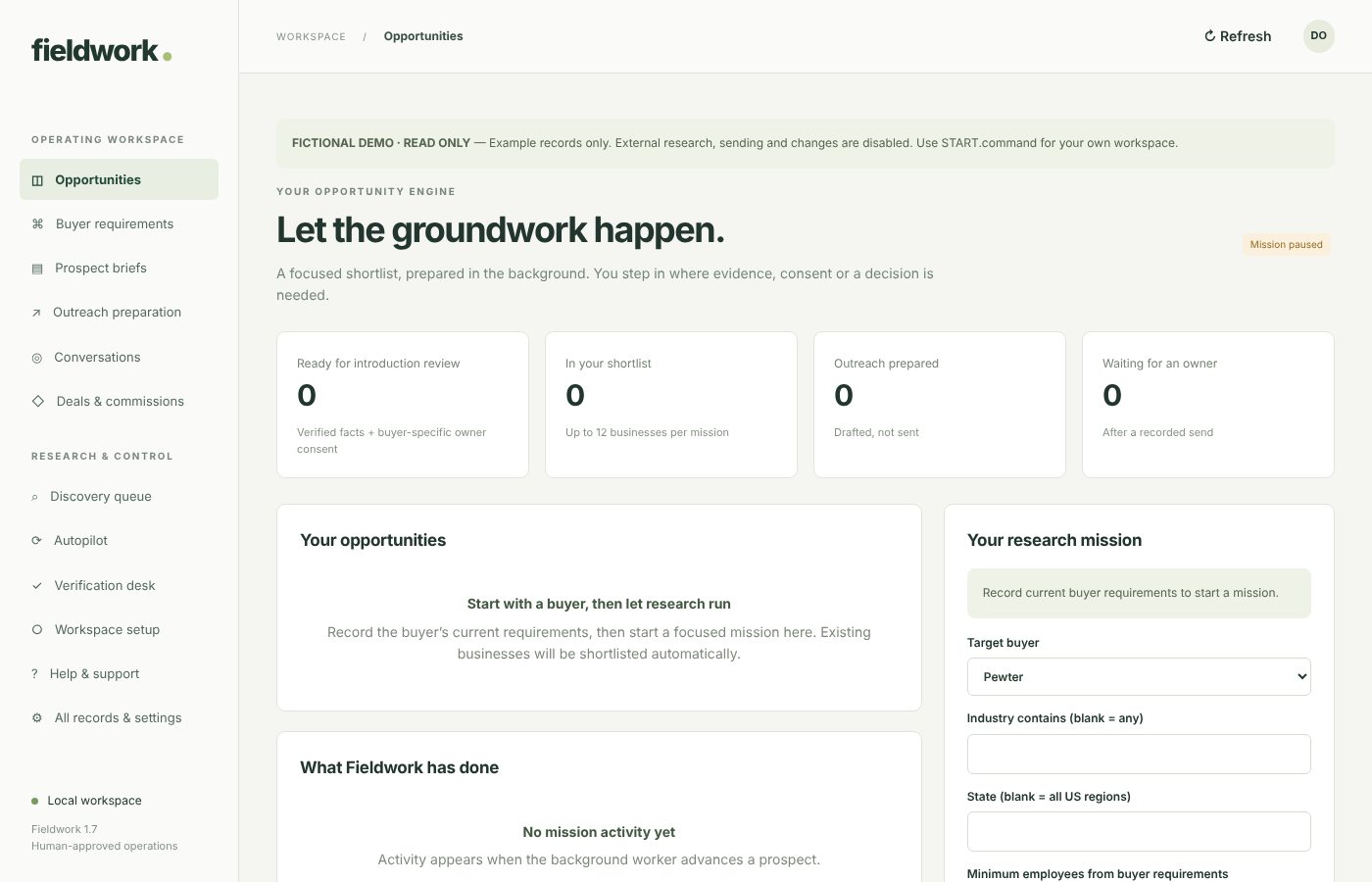
An evidence-first Mac app for data-licensing deal scouts. It researches established businesses from public sources, checks them against buyer requirements, prepares outreach for human approval, collects owner consent and keeps a commission ledger. It prepares research and drafts, and a person makes every outreach, consent and introduction decision.
Fieldwork
An evidence-first Mac app for data-licensing deal scouts. It researches established businesses from public sources, checks them against buyer requirements, prepares outreach for human approval, collects owner consent and keeps a commission ledger. It prepares research and drafts, and a person makes every outreach, consent and introduction decision.
Screenshots below, from the app's built-in demo
The problem
AI labs and data brokers pay referral fees for introductions to established businesses that hold years of operating records. A business listing is only the start: someone still has to establish which records exist, who controls them, whether a buyer wants them, whether the owner wants an introduction, and how referral credit is recorded. Treating a company score as a qualified deal hides the work that matters. Fieldwork aims to deliver a small queue of opportunities, each with its sources and an explicit list of what still blocks an introduction.
What it does today
- Research: a background job queue reads each company's public pages and records every claim with its source and a confidence label. A discovery queue proposes new businesses from public directories for review, flagging likely duplicates.
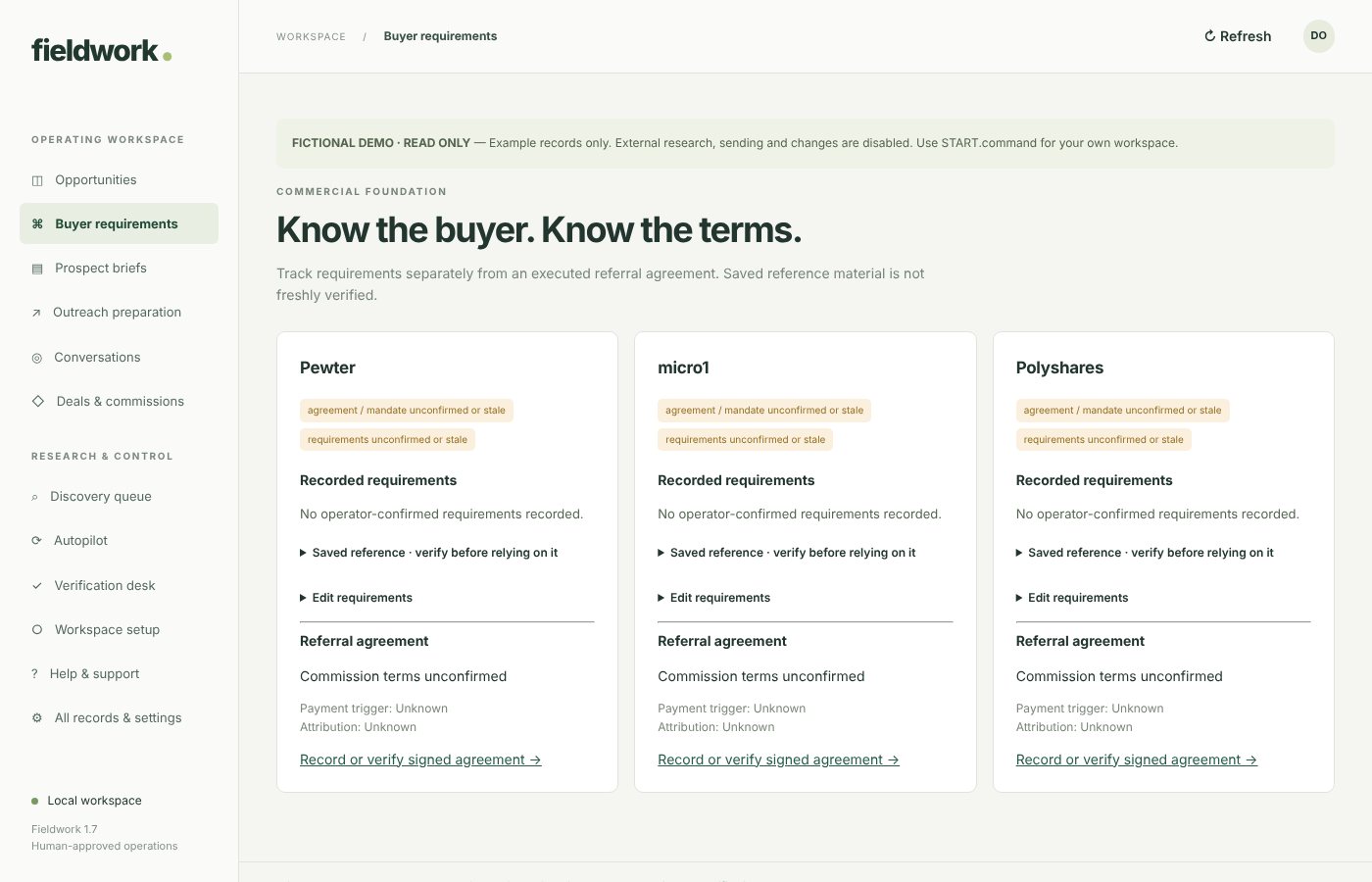
- Buyer requirements: each buyer program's criteria and the referral agreement are recorded separately, with review dates, so expired terms stop counting.
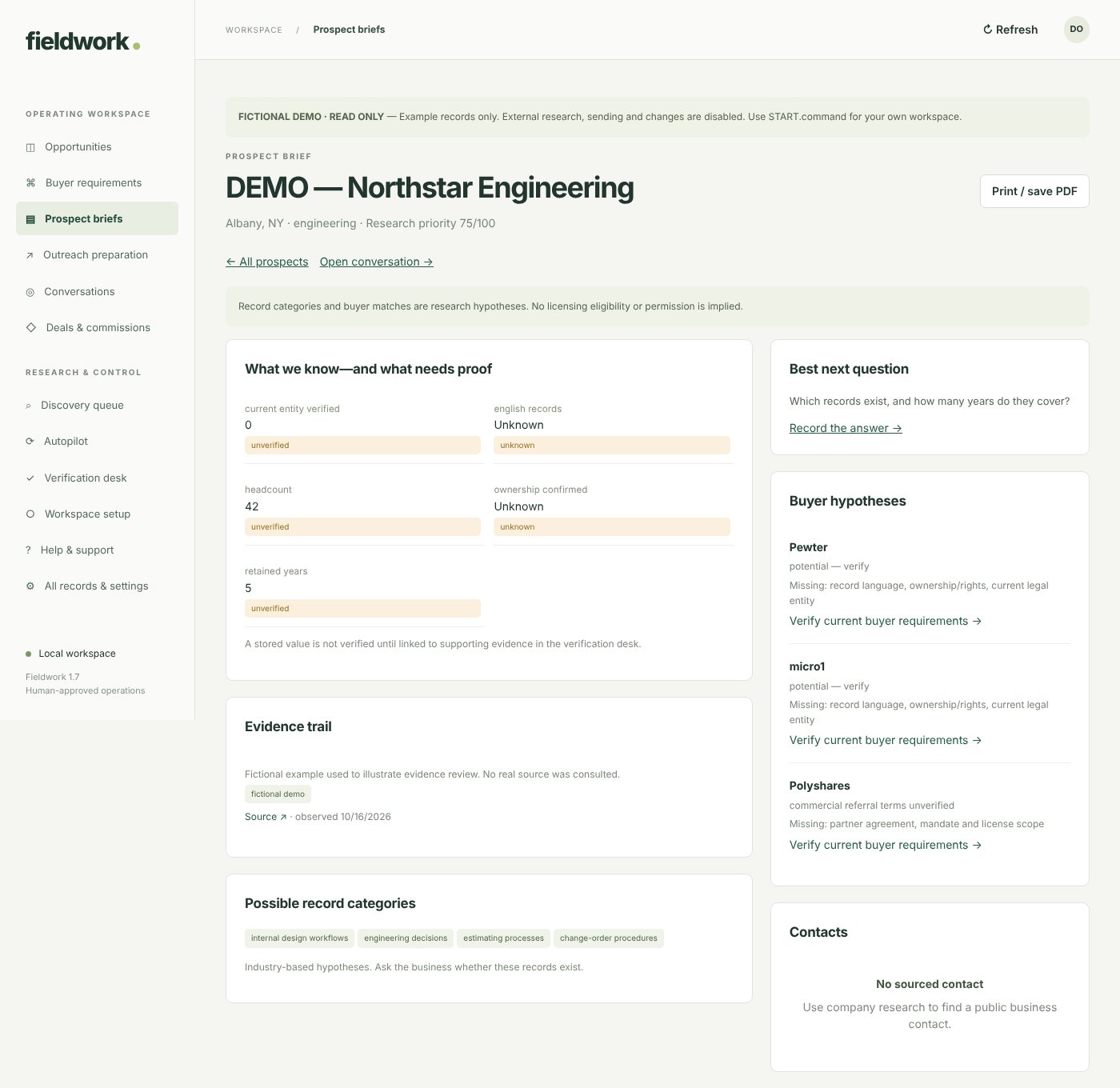
- Prospect briefs: what is known, what still needs proof, likely record categories, and a fit hypothesis for each buyer naming the missing facts.
- Outreach preparation: drafts for sourced contacts, approved by a person before any campaign can send.
- Owner intake, deals and commissions: a single-use owner questionnaire with buyer-specific consent, a deal register, and an append-only ledger of invoices and payments.
Accountable automation
Readiness is recomputed, never stored
An opportunity is "ready for introduction review" only while every check passes: current buyer terms and mandate, verified facts, minimum size and record history, owner consent for that buyer, no suppression, and no competing introduction. Change any of them and it drops back with the reason listed.
Reviews bound to a fingerprint
The final human review signs a hash of the company record, the buyer's requirements, the owner's answers and the fact reviews. If any of those changes afterwards, the review no longer counts and the packet has to be looked at again.
Approval of exact messages
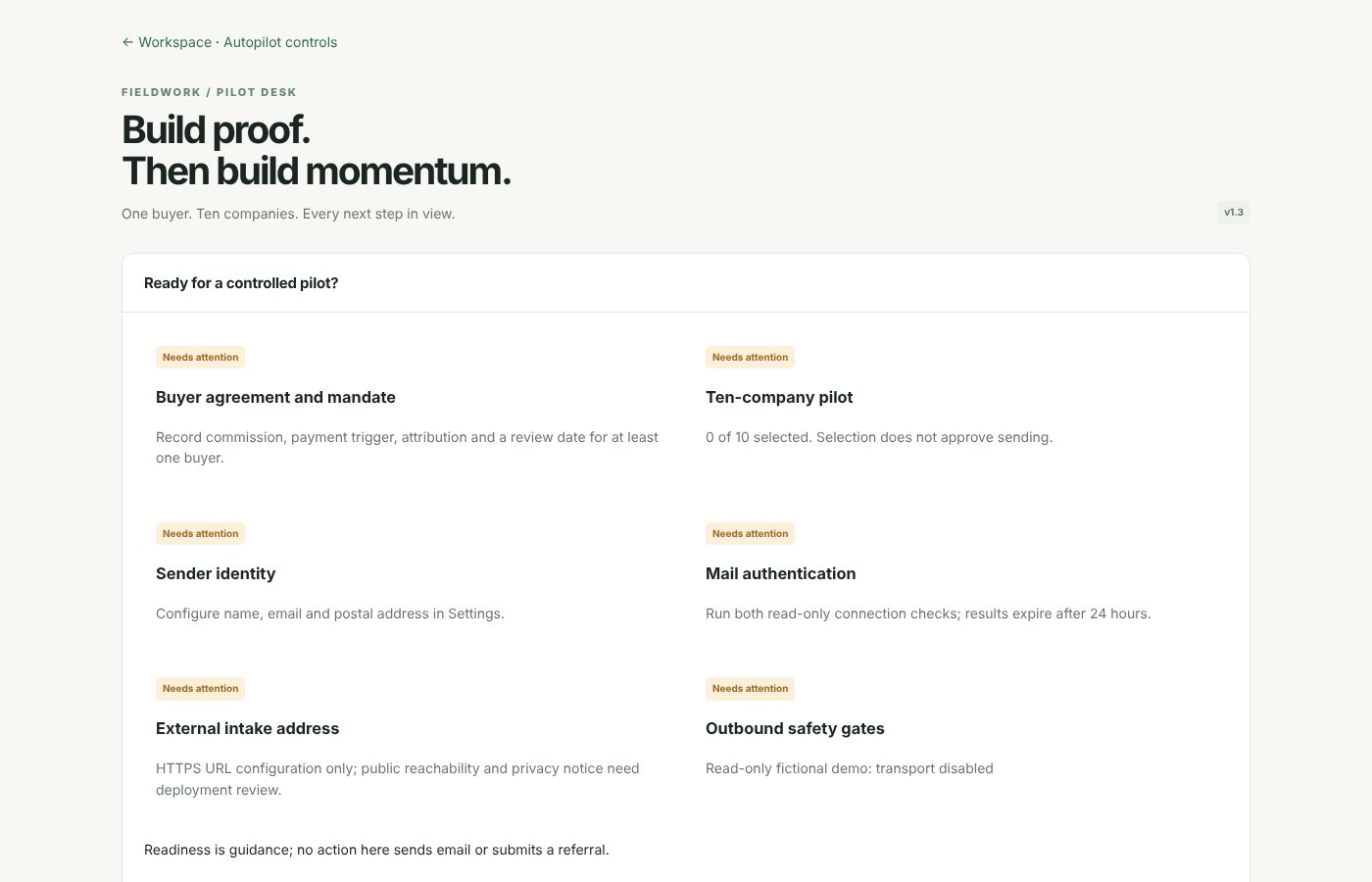
Campaign approval is bound to the exact text and recipients and expires. Sending also needs mail credentials, a separate delivery switch, daily limits and an unsuppressed contact. A send that crashes midway becomes "needs reconciliation" rather than being retried, so it can't double-send.
Durable background work
Research jobs live in the database with retries and backoff, and permanent failures are blocked with the reason shown. Daily usage limits cap research and paid search, which starts off.
A careful crawler
It obeys robots.txt, resolves each hostname first and refuses private or local network addresses. An optional local model may read page text, but its output is stored as a research hypothesis, never as a fact.
Money that adds up
The commission ledger only adds entries, and each one has a unique request key so a retried click can't double-count. Expected revenue shows as "Unknown" rather than a guess.
In use on my Mac
Fieldwork runs on my own Mac with research switched on. Its workspace holds 92 company research records, 109 contact records, 109 prepared outreach drafts and 361 sourced evidence rows, with a buyer referral agreement confirmed and on file.
Built as a desktop product
- Native Mac app: a Swift, AppKit and WebKit window around a bundled Python runtime, so it needs no Python install. Apple Silicon, macOS 14 or later, signed locally but not notarized by Apple.
- Data kept separate: the workspace lives outside the app, with automatic backups, and a one-time migration moved the original database across with its records intact.
- Standard-library Python and SQLite with a plain HTML, CSS and JavaScript interface. Customer builds ship without any data, and a read-only fictional demo can be explored safely.
- Tests: 89 backend and workflow tests and 3 desktop tests (startup without system Python, migration that preserves records, rejection of a corrupt database).
Built with ChatGPT and Codex, from my product direction, workflow design and testing. An optional local model, run through Ollama, can read public page text and suggest what a business does; the app labels that output an unverified hypothesis.
Sister app · Local AI
Money Desk
A workbench for finding and doing paid work with local models, from scoring ideas to hunting gigs and bids and drafting the replies.
Money Desk
A workbench for finding and doing paid work with local models, from scoring ideas to hunting gigs and bids and drafting the replies.
Runs locally on a Mac
- Lines of code
- 9,800
- Studio tools
- 11
- Sales pipelines
- 5
- Assist stages
- 5
- Coach characters
- 29
- Starter prompts
- 48
Research and ideas
Ideas scored on demand, competition, effort and speed, with a skeptical-investor critique. Research briefs from web search mark which facts came from sources and which are guesses.
Gig Hunter and RFP Hunter
Every few hours it reads public job boards, scores what's left against ten skills and drafts replies. A separate tool ranks public government bids by fit, profit and complexity.
A five-stage assist chain
Brainstormer, Assessor, Planner, Executor and Content Creator, each seeing everything earlier stages produced, with prompts editable in the app.
Model choice and resilience
It picks the best installed model, retries without the reasoning flag for models that lack it, uses a vision model for photo listings, and runs long jobs on the server so a closed tab never loses a result.
Case study 43 · Brokerage website + AI toolkit
Northfield Realty
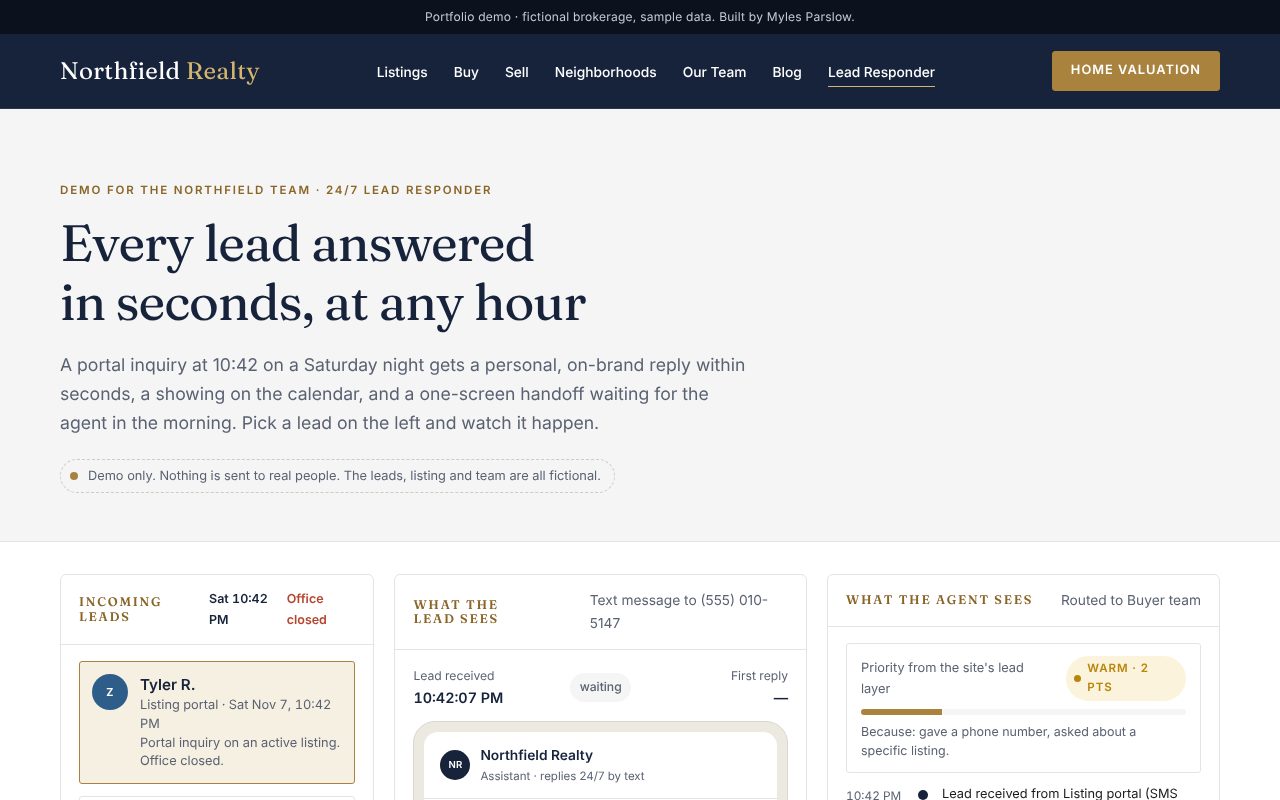
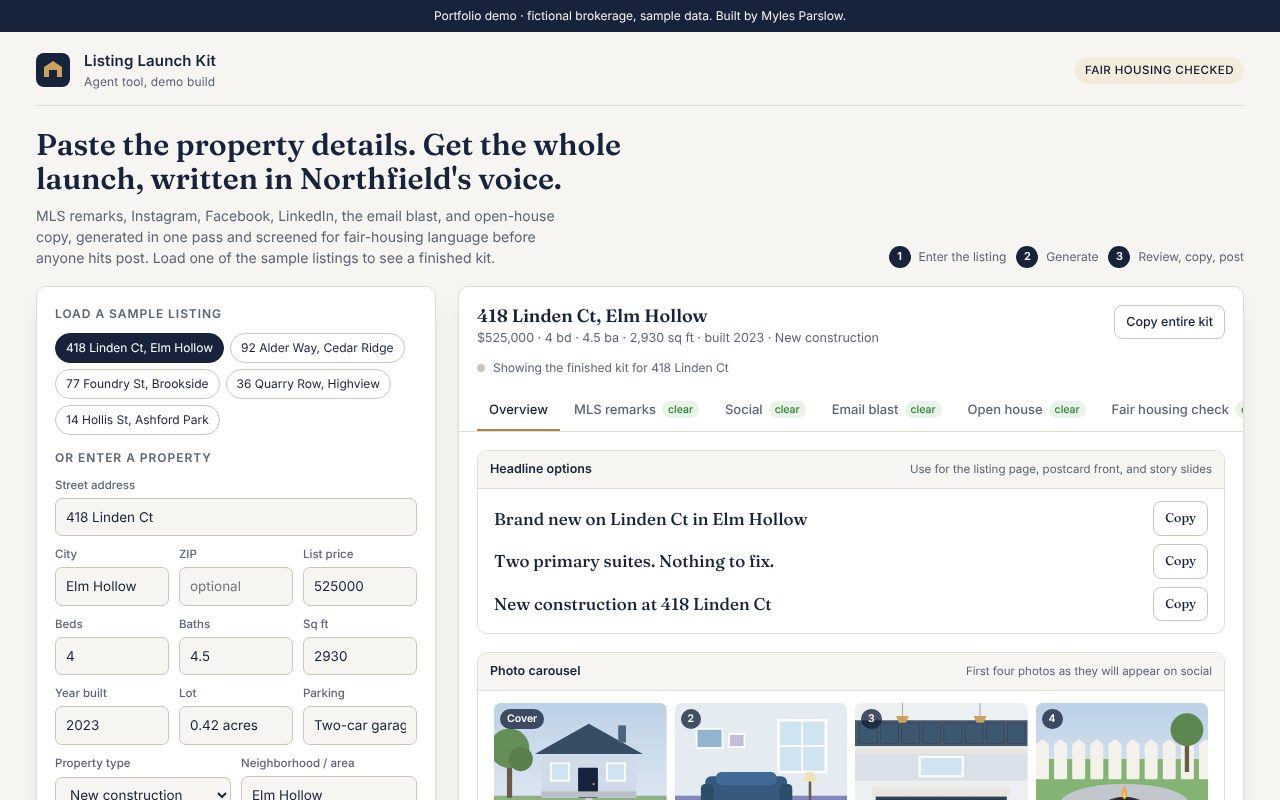
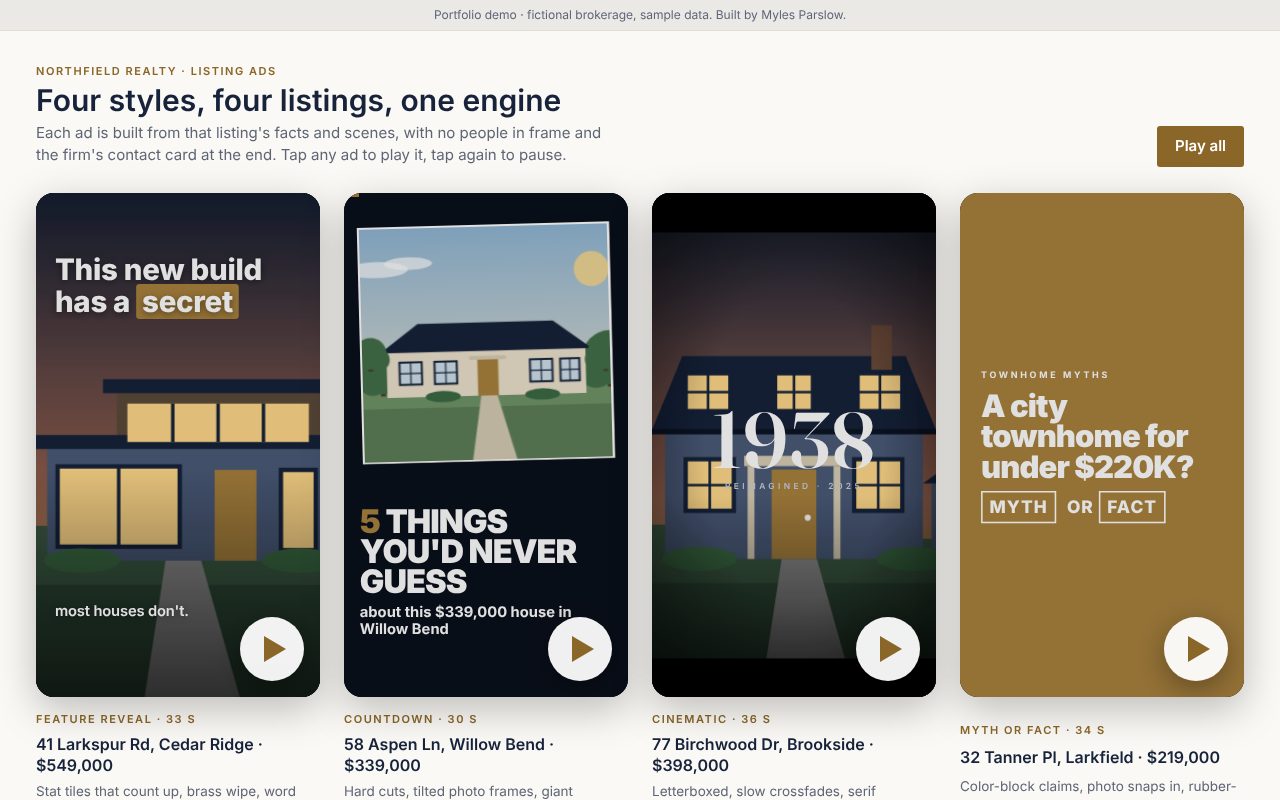
A full website and ten working AI tools for an independent boutique brokerage, built in a weekend. The site has plain-English listing search, 48 local guides and buyer and seller calculators. The tools cover a 24/7 lead responder, reviews, listing marketing, virtual staging, video ads, social posts, client emails, market reports and a Team Hub that holds them all. Shown with a fictional firm and sample data.
Northfield Realty
A full website and ten working AI tools for an independent boutique brokerage, built in a weekend. The site has plain-English listing search, 48 local guides and buyer and seller calculators. The tools cover a 24/7 lead responder, reviews, listing marketing, virtual staging, video ads, social posts, client emails, market reports and a Team Hub that holds them all. Shown with a fictional firm and sample data.
Open the full buildThe websiteThe Team HubFictional firm. Client details, names, photos and figures have been changed
- Working AI tools
- 10
- Blog guides
- 48
- Calculators
- 3
- Neighborhoods covered
- 8
- Video ad styles
- 4
- Time to build
- A weekend

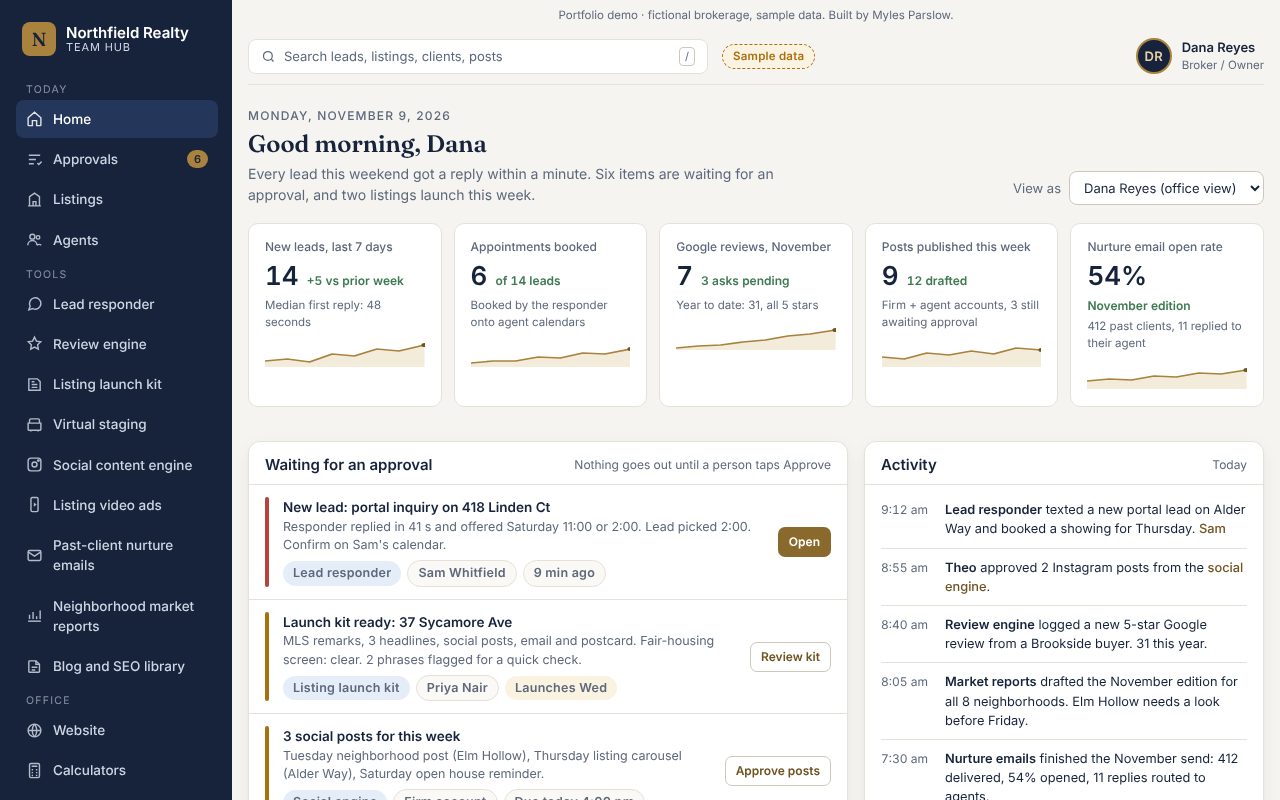
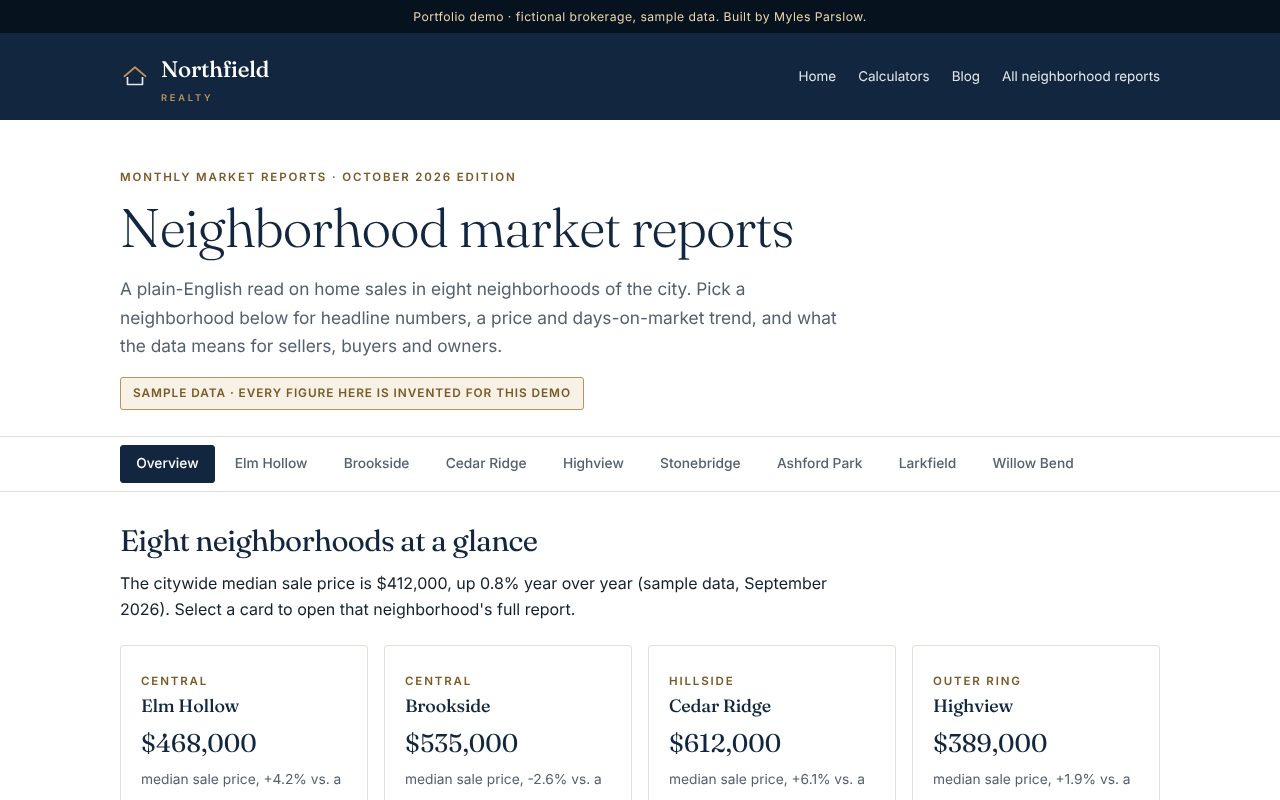
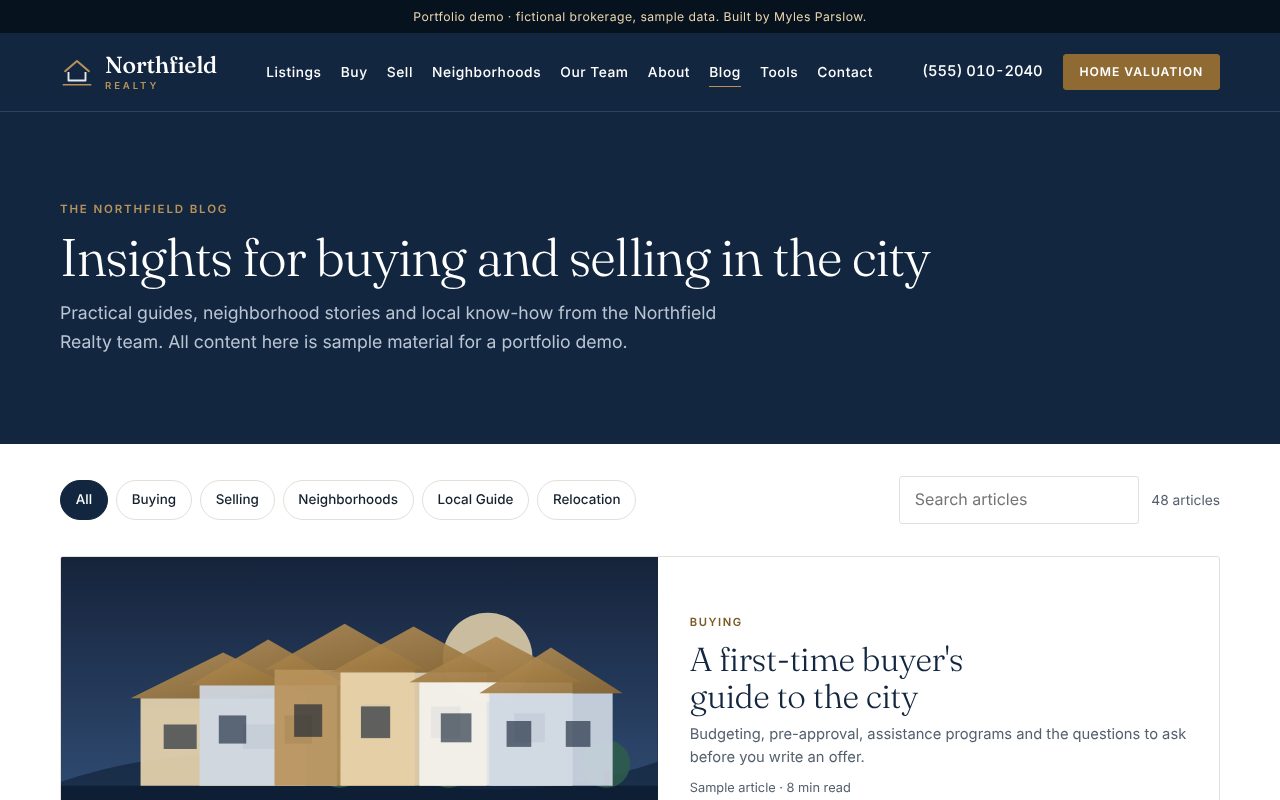
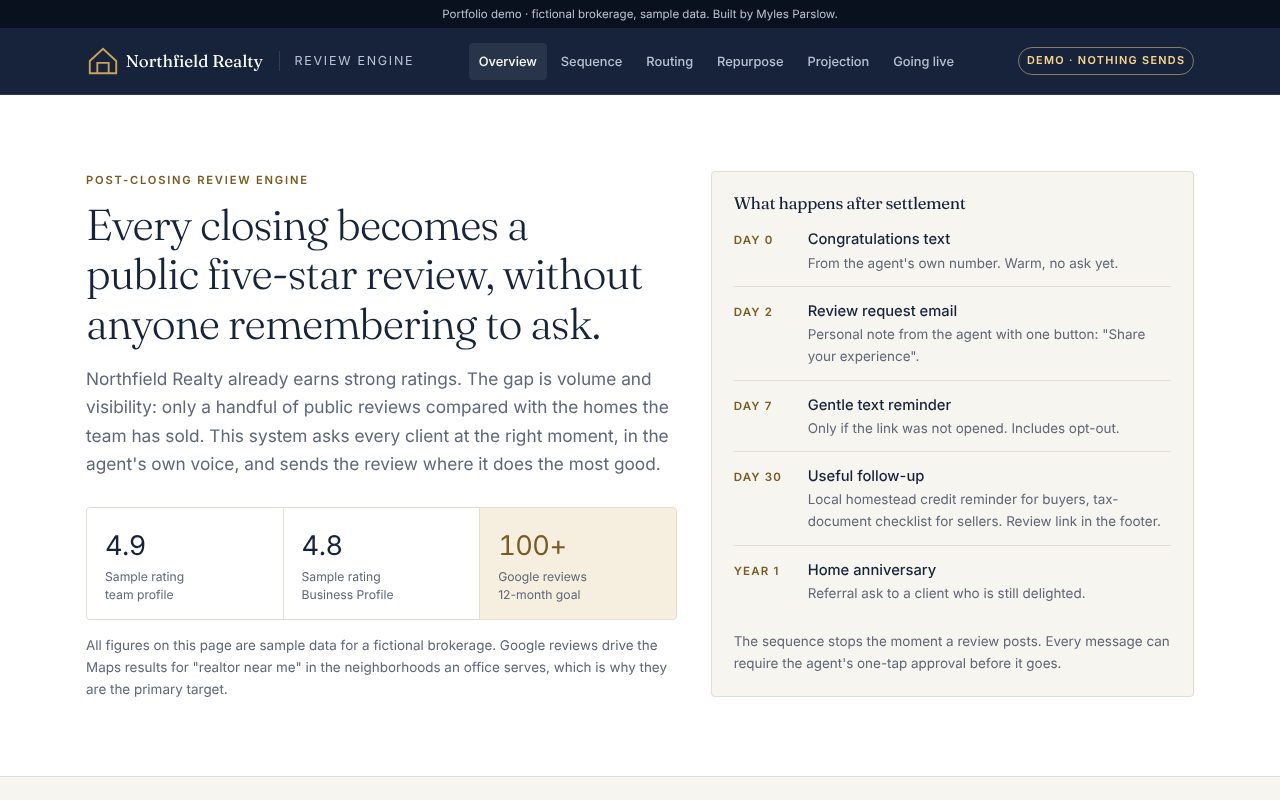
The website
- Brokerage site: listing search by filters or by a sentence like “3-bed in Elm Hollow under $900k with a garage”, featured and sold listings, neighborhoods, team, reviews, and valuation and contact forms.
- Blog and SEO library: 48 guides, from neighborhood profiles and comparisons to buyer and seller explainers, each with quick answers, FAQs and structured data, plus category filters and live search.
- Calculators: monthly payment, affordability and seller net proceeds, plus listing-alert sign-up.
- Website security report: plain-language findings on a hacked site (hidden spam links, a poisoned robots.txt, an outdated CMS) and a three-phase cleanup plan.
- Case study: the pitch behind it, built as three optional layers so the firm never has to throw away what works.
The AI tools
- Team Hub: leads, approvals and activity in one dashboard, every tool opening inside it, and a view-as switcher for each agent.
- 24/7 lead responder: replies by text and email in under a minute, qualifies the lead and books a showing on the right agent's calendar.
- Review engine: day 0, 2, 7, 30 and one-year touches after closing, and reviews reused on the site and social.
- Listing launch kit: MLS remarks, social posts, an email blast and open-house copy from one set of details, with a fair-housing screen.
- Virtual staging, vertical video ads and a social engine that drafts a week of posts and video scripts for approval.
- Past-client emails with a monthly home value and equity note, and market reports for eight neighborhoods.
Built with Claude, with Gemini for the virtual-staging images (shown here as illustrations). I researched the market, chose the features, set the tone and copy rules, and made sure every tool checks for fair-housing problems and waits for a person to approve before anything goes out. Claude built the website, the blog, the tools and the Team Hub.
Consumer apps
Apps for people planning their own lives. All names and figures in the screenshots are invented.
Case study 23 · iPhone and Mac app
Thrifty Vows
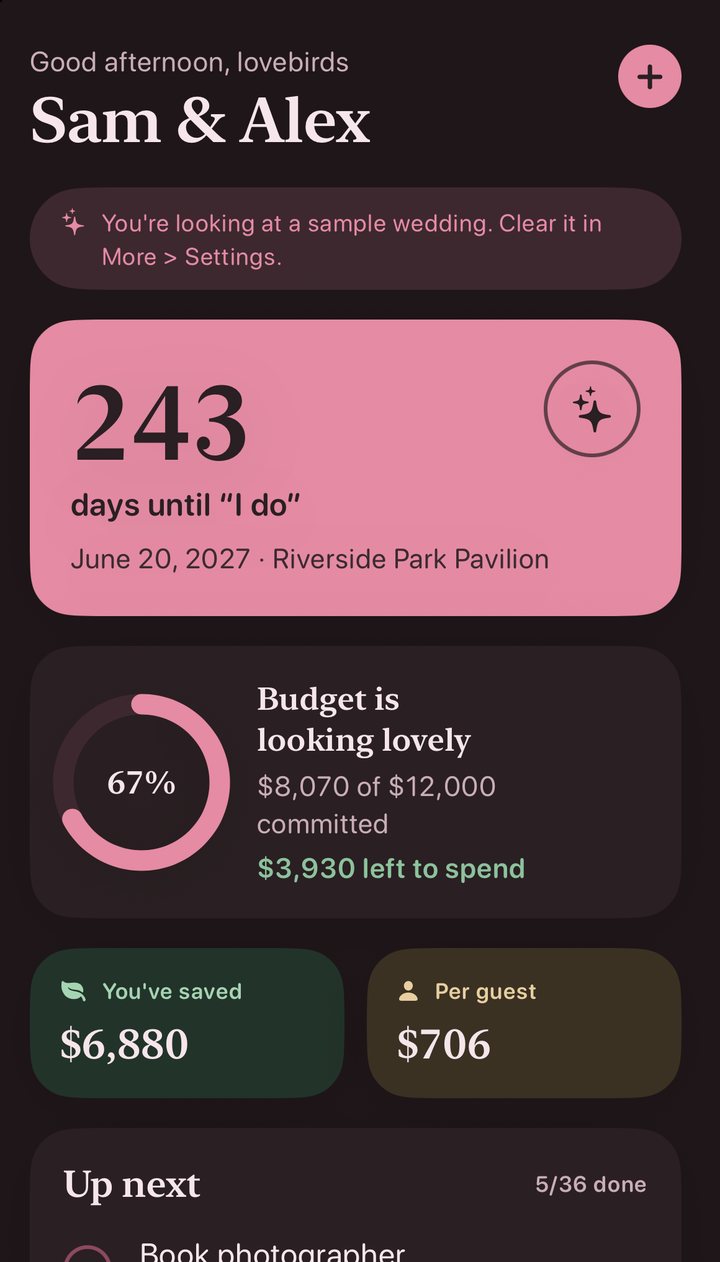
A budget-first wedding planner for iPhone and Mac that plans the whole day around one number: what the couple can actually afford. It went from product plan to a working app, then through a full visual redesign, "Blush & Petal", with a custom icon, dark mode and a native Mac build.
Thrifty Vows
A budget-first wedding planner for iPhone and Mac that plans the whole day around one number: what the couple can actually afford. It went from product plan to a working app, then through a full visual redesign, "Blush & Petal", with a custom icon, dark mode and a native Mac build.
Watch the walkthrough and try the budget toolsScreenshots below come from the app's built-in sample wedding
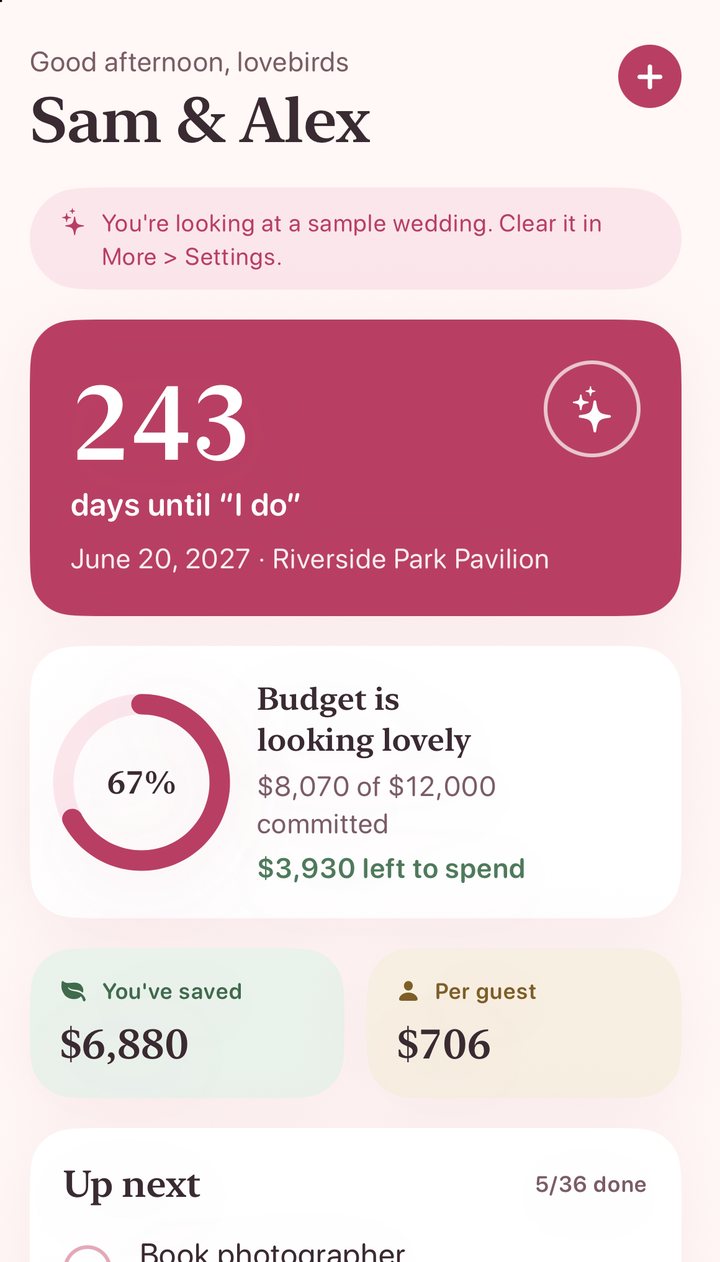
The problem
The big wedding apps, The Knot, Zola and WeddingWire, earn money by selling couples' details to vendors and pushing registries, so their design nudges spending up. The couples who most need help are those with under about $15,000 to spend (the US average is around $33,000), usually paying for it themselves and planning without a planner.
Thrifty Vows earns money only from the couple, so it can be honest about spending less. The plan is a free core app and a one-time Pro unlock for sync, sharing, exports and widgets, with no subscription.
What it does
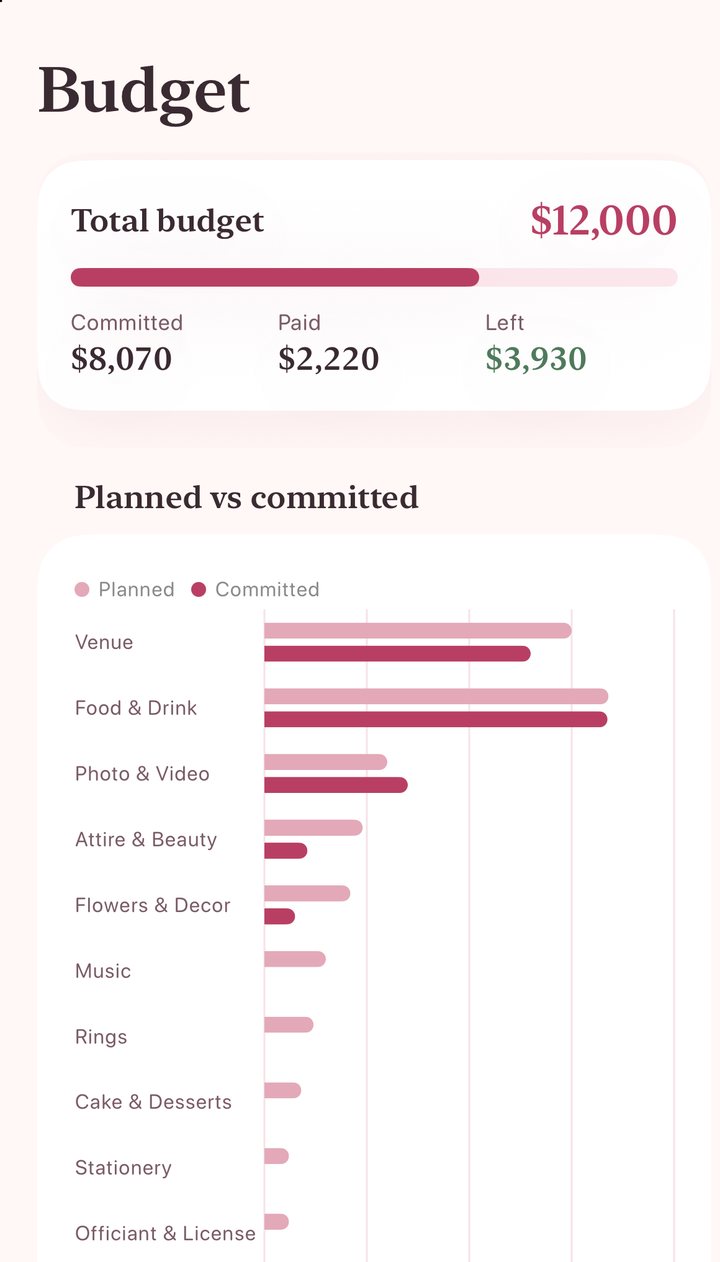
- Budget: a total split into 13 categories by a recommended budget-wedding allocation, with estimate, final cost, amount paid and due date on every expense.
- The guest-count lever: a calculator separates fixed costs from the ones that grow with each guest, and shows in dollars what adding or cutting people does.
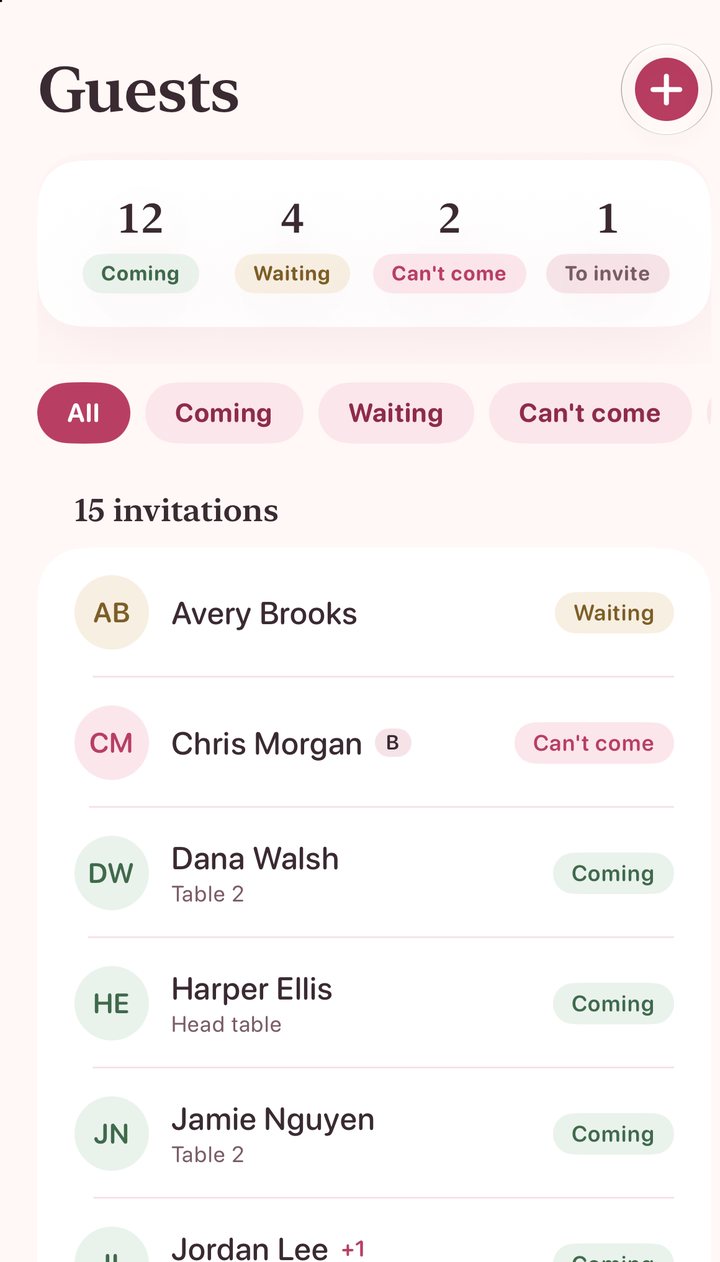
- Guests and RSVPs: sides, A and B lists, plus-ones, meals and households, swipe to RSVP, and CSV export.
- Checklist: tasks dated backwards from the wedding and grouped by phase. Move the date and the open tasks move with it.
- Vendors, seating and DIY: quotes compared side by side, with a booking written straight into the budget; tables with capacity warnings; and DIY projects that weigh making against buying.
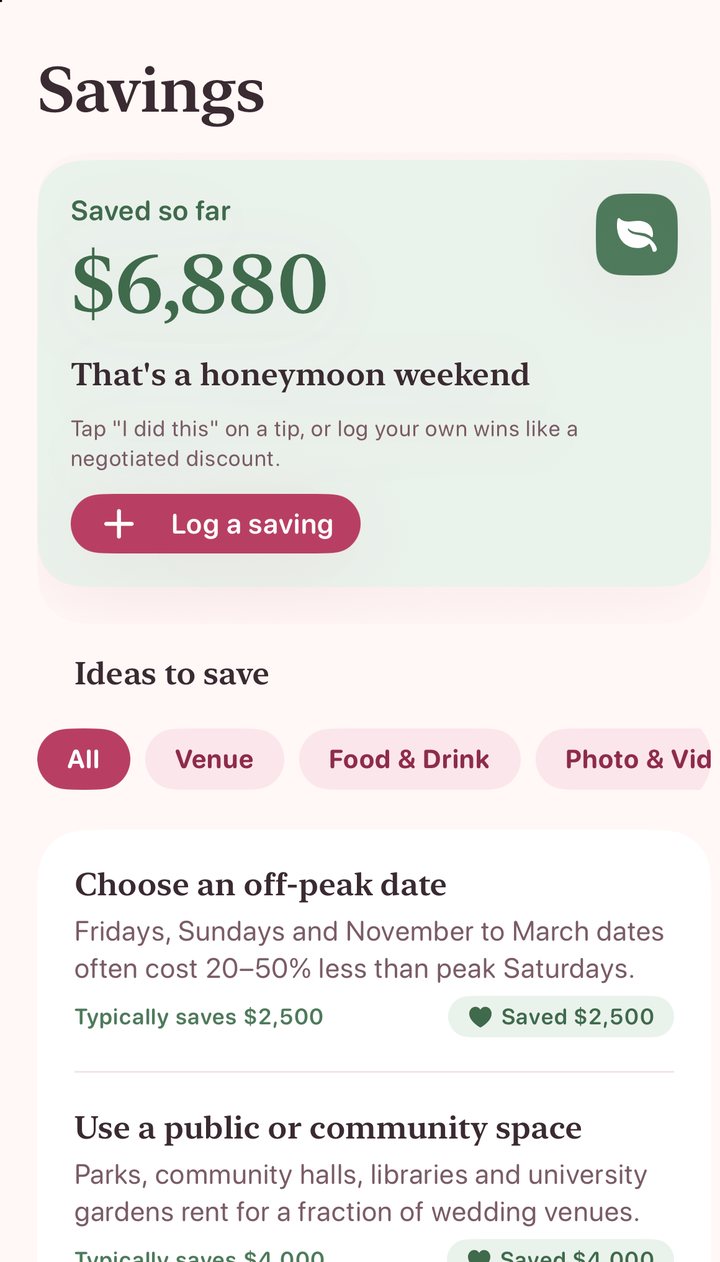
- Savings tips: concrete tips, each with a typical saving, that add to a running total on the home screen.
Decisions behind it
Savings first, not spend first
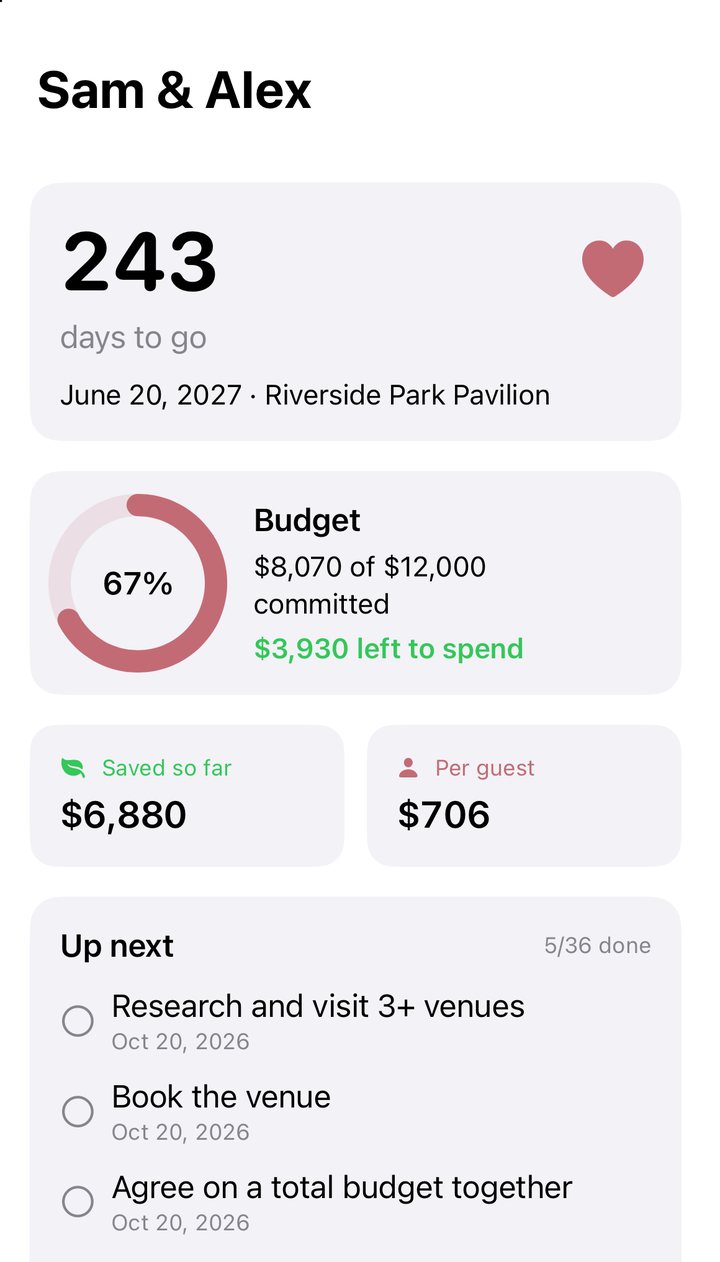
The home screen leads with money saved and cost per guest, where the big wedding apps lead with vendors and inspiration.
Useful in the first minute
A sample wedding loads on first launch, so there is something to explore before typing anything. One switch in Settings clears it.
Opinionated defaults
The budget split, checklist and tips are pre-filled for a budget wedding. Food and venue get the largest shares, and a contingency line is kept on purpose.
Private by design
No account, no backend and no third-party code. Everything is stored on the device and works offline; iCloud sync is planned as part of Pro.
Built to grow
SwiftUI and SwiftData with simple models, so sync, sharing and widgets can be added without restructuring.
Gentle and personal
Heart-shaped checkboxes, a little confetti and haptics when a task is done, and copy such as "Budget is looking lovely" instead of spreadsheet language.
The 2.0 redesign
Version 1 worked but looked like stock iOS. Version 2.0, "Blush & Petal", was designed first as a mockup and then built into the app: rose for actions, blush cream behind everything, sage for money saved and champagne for neutral highlights, with serif headings over rounded body text. It added a custom icon of interlocking rings, a dark mode with its own plum palette, and a native Mac version of the same app.
Where it goes next
- 1.1: iCloud sync and partner sharing, contacts import, PDF export and a countdown widget.
- 1.2: a shareable RSVP link, a day-of timeline and payment reminders.
- Later: anonymous price benchmarks by city, and swap suggestions such as a brunch reception instead of dinner.
Measures of success
Couples set a budget and add at least ten guests in their first week, the median saving logged per couple, Pro conversion, and an App Store rating of 4.7 or better.
Built with Claude, from a one-line brief: an industry-leading app for planning a cheap wedding. Claude wrote the product plan, the SwiftUI code, the 2.0 design mockup and the redesign, then built and ran the app on my Mac and took the screenshots. I set the direction and reviewed each round.